
Computer use agent: what it is, how it works and what you can automate with one
A computer use agent is an AI agent that operates a computer the way a person does: it looks at the screen, decides what to do, then clicks, types and scrolls until the task is finished. Because it works through the screen rather than an API, it can use any website or desktop app, including the ones no integration covers. Sai is a computer use agent that runs on its own cloud computers, so it can, for example, log in to three vendor portals, download every invoice and total them in a sheet while you do something else. This guide explains how computer use agents work, how they compare with APIs and RPA, what they cost, and how to give one your first task.
Tools: Chrome, Google Drive, Google Sheets, Gmail
TL;DR: computer use agents in one minute
- What it is. An AI agent that uses a computer through the screen, mouse and keyboard, like a person.
- Why it matters. It works in any app or website, not only the ones with an API or a connector.
- How it works. A loop: take a screenshot, decide the next action, act, check the result, repeat.
- How good it is. On OSWorld 2.1, the open benchmark for real computer tasks, Sai scores 77.3%.
- How to stay safe. Give it its own computer and accounts, and keep approvals on for anything it can’t undo.
What is a computer use agent?
A computer use agent (also called a computer-using agent or CUA) is an AI agent whose way of acting is the computer itself. Instead of calling an app’s API, it reads pixels and text on the screen, moves the pointer, clicks buttons, fills in forms and switches between applications. Anything a person can do at a computer, it can attempt.
That is what makes it different from a chatbot, which only answers, and from most automation tools, which only work where someone has built a connector. Sai is a computer use agent that goes one step further and runs a fleet of computers at once, which is why we call it a robosecretary.
How a computer use agent works
Every computer use agent runs the same basic loop until the task is done or it needs a person:
- Look. Capture the screen and read what is on it: windows, buttons, text, tables.
- Plan. Decide the next step toward the goal, using the task, any rules you gave it and what happened so far.
- Act. Click, type, scroll, press a shortcut, open a file or run a command.
- Check. Look again to confirm the action worked, and recover if a page changed or an error appeared.
- Stop when needed. Pause for a login, a security check or an action that needs approval.
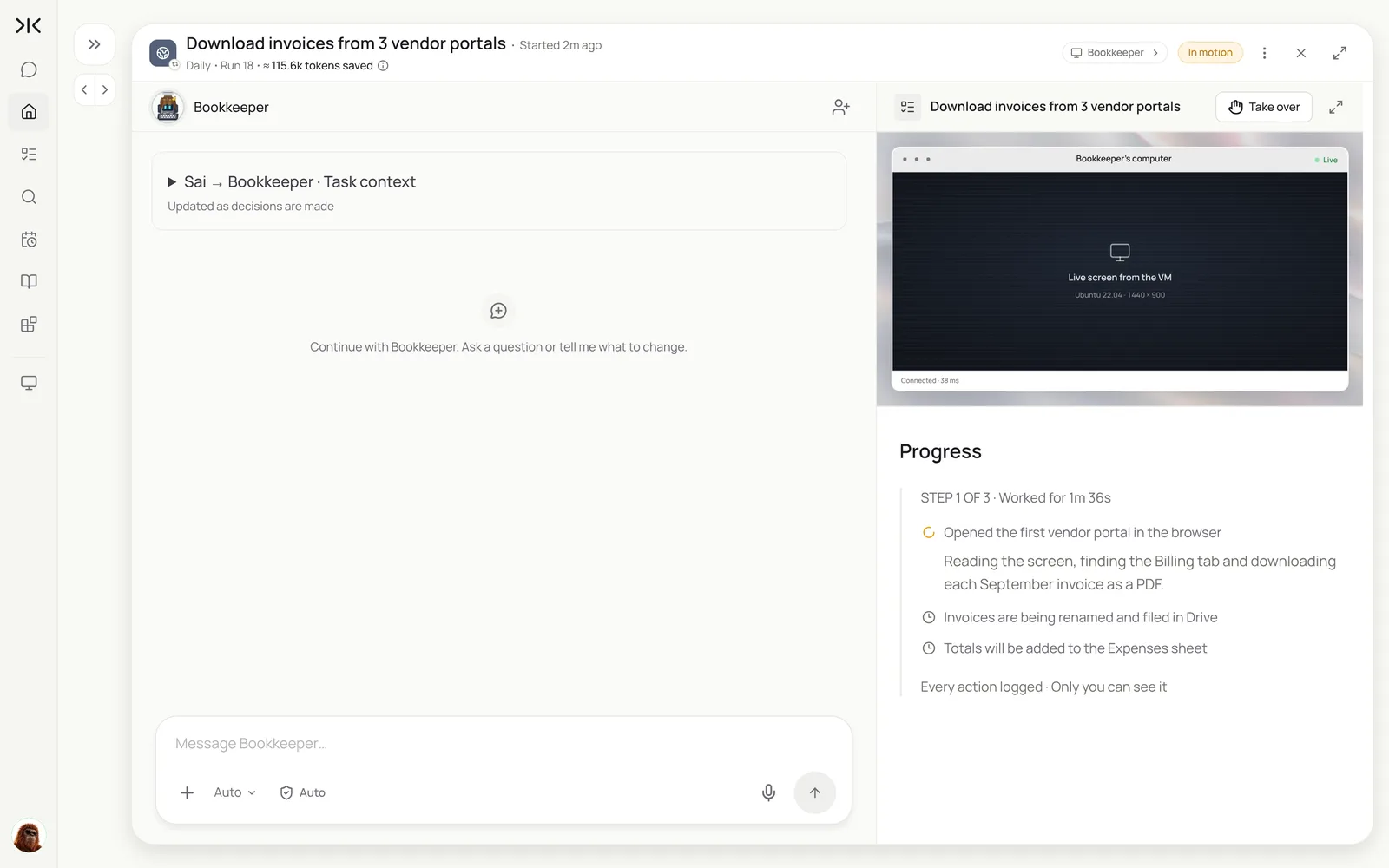
In Sai the computer is a cloud virtual machine with a browser and desktop apps, or your own Mac when a task needs local files. You can watch the live screen at any time and take over.
Ready-made skills for common computer use jobs, such as desktop automation, Mac automation and SAP GUI automation, are in the Sai Skills Marketplace.
Computer use agent vs. API automation vs. RPA
All three automate work on a computer. They differ in what they need from you and what breaks them.
| API automation | RPA (recorded bots) | Browser extension | Computer use agent | |
|---|---|---|---|---|
| How it acts | Calls each app’s API | Replays recorded clicks | Acts in your open browser tab | Reads the screen and decides each step |
| Works with | Apps that have an API and a connector | Desktop and web apps | Websites only | Any website or desktop app |
| When the screen changes | Not affected | Breaks; needs re-recording | Often breaks | Adapts, because it reads the screen |
| Setup | Map fields and triggers | Record and maintain scripts | Install and keep the tab open | Describe the task in a sentence |
| Runs while you’re away | Yes | Yes, on a bot machine | No | Yes, on its own cloud computer |
| Best for | High-volume, stable data syncs | Fixed, high-volume back-office steps | Quick one-off actions | Varied tasks across many apps |
They work well together. Sai uses integrations where they exist, such as Gmail or Notion, and the screen everywhere else. For a broader comparison of tools, see computer use agents compared.
What can a computer use agent do?
The best tasks repeat, cross several apps, and follow rules you could write down. Common ones:
| Task | Apps involved | Guide |
|---|---|---|
| Download invoices from vendor portals and log totals | Vendor websites, Drive, Sheets | AI bookkeeping |
| Build a lead list with buying signals | LinkedIn, company sites, Sheets, HubSpot | AI lead generation |
| Triage the inbox and draft replies | Gmail, Calendar | AI email assistant |
| Update the CRM from call notes | Docs, Salesforce or HubSpot | Sai × Salesforce |
| Screen applicants against a scorecard | ATS, LinkedIn, Sheets | AI recruiter |
| Check stock and orders across stores | Shopify admin, marketplaces, Sheets | Sai × Shopify |
| Research and monitor competitors | Websites, X, Docs | AI research analyst |
| Fill the same form in several portals | Supplier or government portals | Write it as a task, below |
When you hand a computer use agent a whole role rather than one task, it becomes an AI employee.
How good are computer use agents today?
The standard test is OSWorld, an open benchmark of real tasks on real operating systems and apps, scored by whether the task was actually completed. On OSWorld 2.1, Sai achieves a 77.3% partial score (79.4% counting repeated runs) at an average API cost of $14.34 per task. On OSWorld 2.0, built from long tasks that take a skilled person more than an hour, Sai scored 73.0%. Read the full OSWorld results.
In practice that means a computer use agent finishes most well-described tasks on its own and asks for help on the rest. It is strongest when the task is specific and the rules are written down, which is why Sai uses skills and an approval queue.
Try it: give a computer use agent your first task
Write the task the way you would brief a colleague: where to go, what to do, where the result belongs, and when to stop and ask.
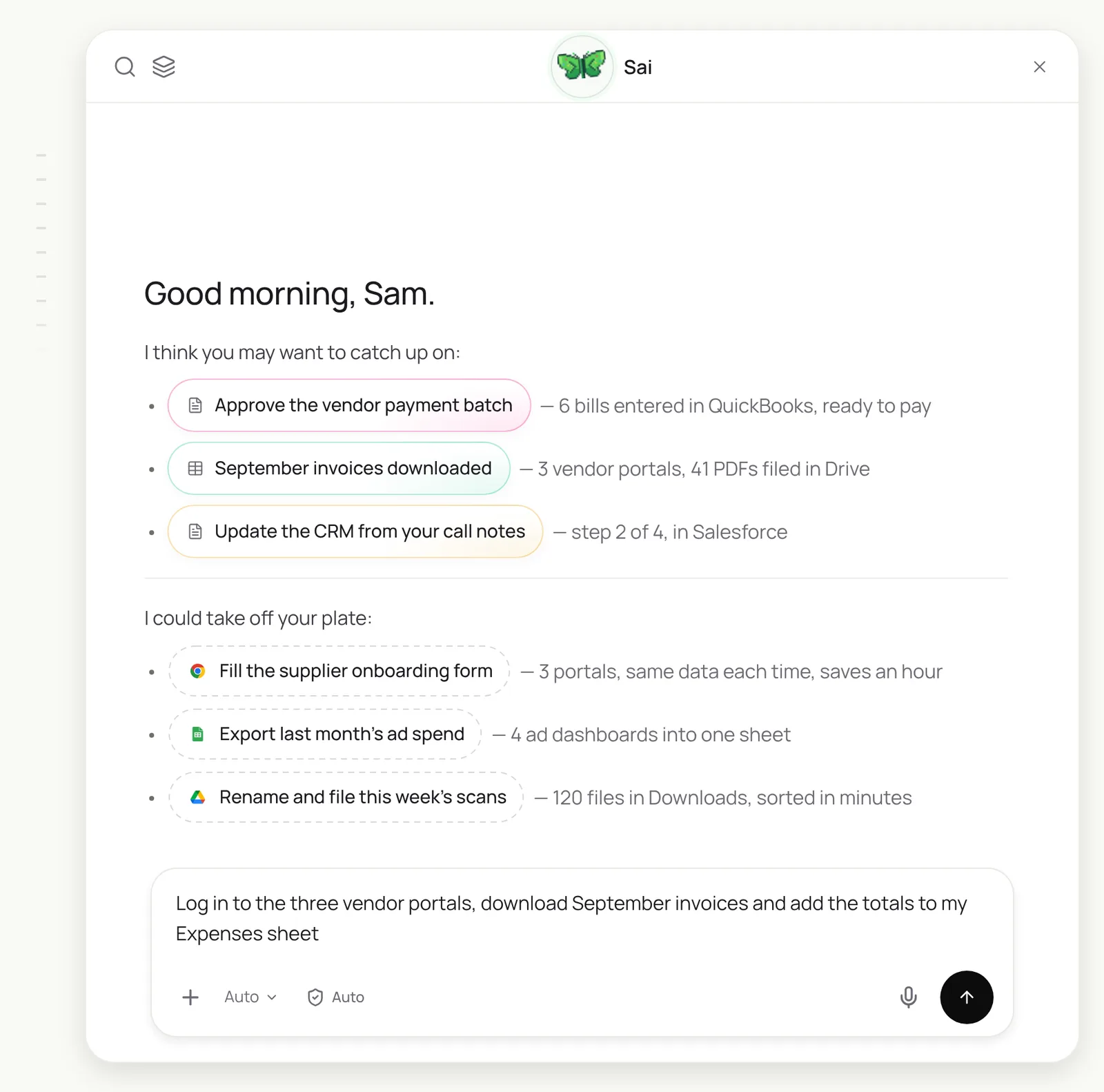
Log in to our three vendor portals (Northwind, Acme Supply, Cloudline) using the saved sign-ins.
Download every invoice dated September 2026 as a PDF.
Rename each file vendor-invoice#-date and put it in Drive > Finance > Invoices > 2026-09.
Add one row per invoice to the Expenses sheet: vendor, number, date, amount, due date.
If a portal asks for a code or shows an error, stop and ask me.
Log in to our three vendor portals, download every September invoice, rename and file them in Drive > Finance > Invoices > 2026-09, and add one row per invoice to the Expenses sheet. Stop and ask if a portal wants a code.
- 14 invoices downloaded
- 19 invoices downloaded
- 8 invoices downloaded
- 41 files filed
- 41 rows · $28,460
Which agents Sai uses on a computer
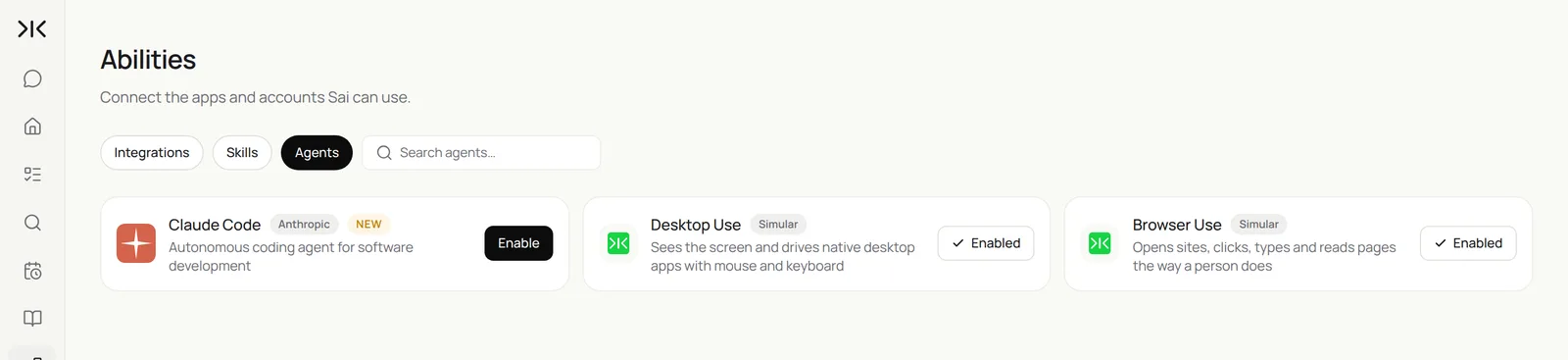
Sai routes each step to the right kind of agent. Desktop Use drives native desktop applications, Browser Use works on websites, and coding agents such as Claude Code can be enabled for software work. You can see and switch them in Abilities → Agents.
How much does a computer use agent cost?
With Sai, you pay for computer time: the minutes an agent controls a computer. Chat, planning, waiting for your approval and the time between scheduled runs are free. The Free plan includes one cloud computer with a daily allotment of computer time; Pro at $50 a month suits daily routines; Team at $500 a month runs many computers in parallel. See Plans, usage, and limits.
Once a routine is stable, Code-Replay replays the verified steps instead of reasoning through each screen again, which lowers the time and cost of every later run.
Will computer use agents replace RPA and integrations?
Not entirely. For a high-volume data sync between two apps with good APIs, an integration is faster and cheaper per record. Computer use agents win where integrations do not exist, where screens change, and where a task needs judgment across several apps. Many teams keep their integrations and move the long tail of manual work, the portals, spreadsheets and copy-paste, to a computer use agent.
Computer use agents for small business
Small teams usually have no integration budget and plenty of copy-paste. Good first tasks:
- Download invoices and statements from vendor and bank portals every month.
- Copy new orders or sign-ups from one system into another.
- Fill the same supplier, tax or grant forms across several portals.
- Pull weekly numbers from four dashboards into one sheet.
- Rename and file a folder of scans or receipts.
What to look for in a computer use agent
| What to look for | Why it matters | How Sai handles it |
|---|---|---|
| Its own computer | Tasks shouldn’t take over your screen or stop when your laptop sleeps | Cloud computers on every plan; your Mac when you need local files |
| Desktop apps, not just the browser | Lots of work lives outside web pages | Desktop Use and Browser Use agents |
| A live view and a log | You need to see and audit what it did | Live screen while it works, every action logged |
| Approvals before irreversible steps | Sending, paying and deleting need a person | One approval queue; the machine pauses while it waits |
| Reliability on real tasks | Most of the cost is in failures | 77.3% on OSWorld 2.1 |
| Repeatable routines | The value is in work that recurs | Routines on a schedule, with Code-Replay for stable steps |
Example: month-end vendor invoices, by hand and with a computer use agent
An illustrative small business with 3 vendor portals and about 40 invoices a month.
| Step | By hand | With Sai | What the person does |
|---|---|---|---|
| Log in to each portal | 15 minutes, plus password resets | Done with saved sign-ins | Approves a new sign-in once |
| Find and download September invoices | 90 minutes | About 12 minutes of computer time | Nothing |
| Rename and file in Drive | 30 minutes | Included | Nothing |
| Enter totals in the Expenses sheet | 45 minutes | Included, with a link to each PDF | Spot-checks 3 rows |
| Total | About 3 hours | About 10 minutes of review | Approves payment in the bank |
Keep your computer use agent safe
- Give it its own computer and accounts. A cloud computer with only the sign-ins the task needs is easier to audit than your own laptop.
- Approvals on irreversible actions. Sending, paying, posting and deleting wait for a person.
- Watch for instructions in content. A computer use agent reads web pages and emails; Sai treats what it reads as data, not commands, and pauses when a page asks it to do something unexpected.
- Follow each site’s rules. Work at a human pace, and use official integrations where a platform requires them.
- See Security, privacy, and trust for how Sai handles credentials and data.
Frequently asked questions
What is a computer use agent?
A computer use agent is an AI agent that operates a computer through the screen, mouse and keyboard, the way a person does. It can use any website or desktop app, not only those with an API.
How does a computer use agent work?
It runs a loop: capture the screen, decide the next step, click or type, check the result, and repeat until the task is done or it needs a person.
What is the difference between a computer use agent and RPA?
RPA replays recorded steps and breaks when a screen changes. A computer use agent reads the screen and decides each step, so it adapts to changes and handles tasks that vary.
What are computer use agents used for?
Downloading invoices from portals, building lead lists, triaging email, updating CRMs, filling forms across sites, pulling numbers from dashboards and filing documents.
What is a computer-using agent (CUA)?
Computer-using agent and computer use agent mean the same thing: an AI agent that acts by using a computer’s interface rather than an API.
What is the best computer use agent?
Look at results on open benchmarks such as OSWorld, whether it has its own computer, approvals and a live view. Sai scores 77.3% on OSWorld 2.1 and runs a fleet of cloud computers.
Is it safe to let an AI use my computer?
Run it on its own cloud computer with only the accounts it needs, keep approvals on for irreversible actions, and review its log. Sai pauses for logins and security checks.
How much does a computer use agent cost?
With Sai you pay for computer time. The Free plan includes a daily allotment; Pro is $50 a month and Team is $500 a month.
Related guides
Put a computer use agent to work.