
AI bookkeeping: what an AI bookkeeper does and how to set one up
AI bookkeeping means software that does the data work of the books for you: it collects invoices and receipts, enters bills, categorizes transactions, reconciles bank lines and prepares the month-end close. A small business spending 6 to 10 hours a week on this can usually bring it under 1 hour of review. This guide explains what an AI bookkeeper does and doesn’t do, what it costs, and how to set one up step by step with Sai on QuickBooks or Xero, Gmail, Google Drive and your bank’s website, with every payment and every change to a closed period left to you.
Tools: QuickBooks, Xero, Stripe, Gmail, Google Drive, Google Sheets
TL;DR: AI bookkeeping in one routine-driven setup
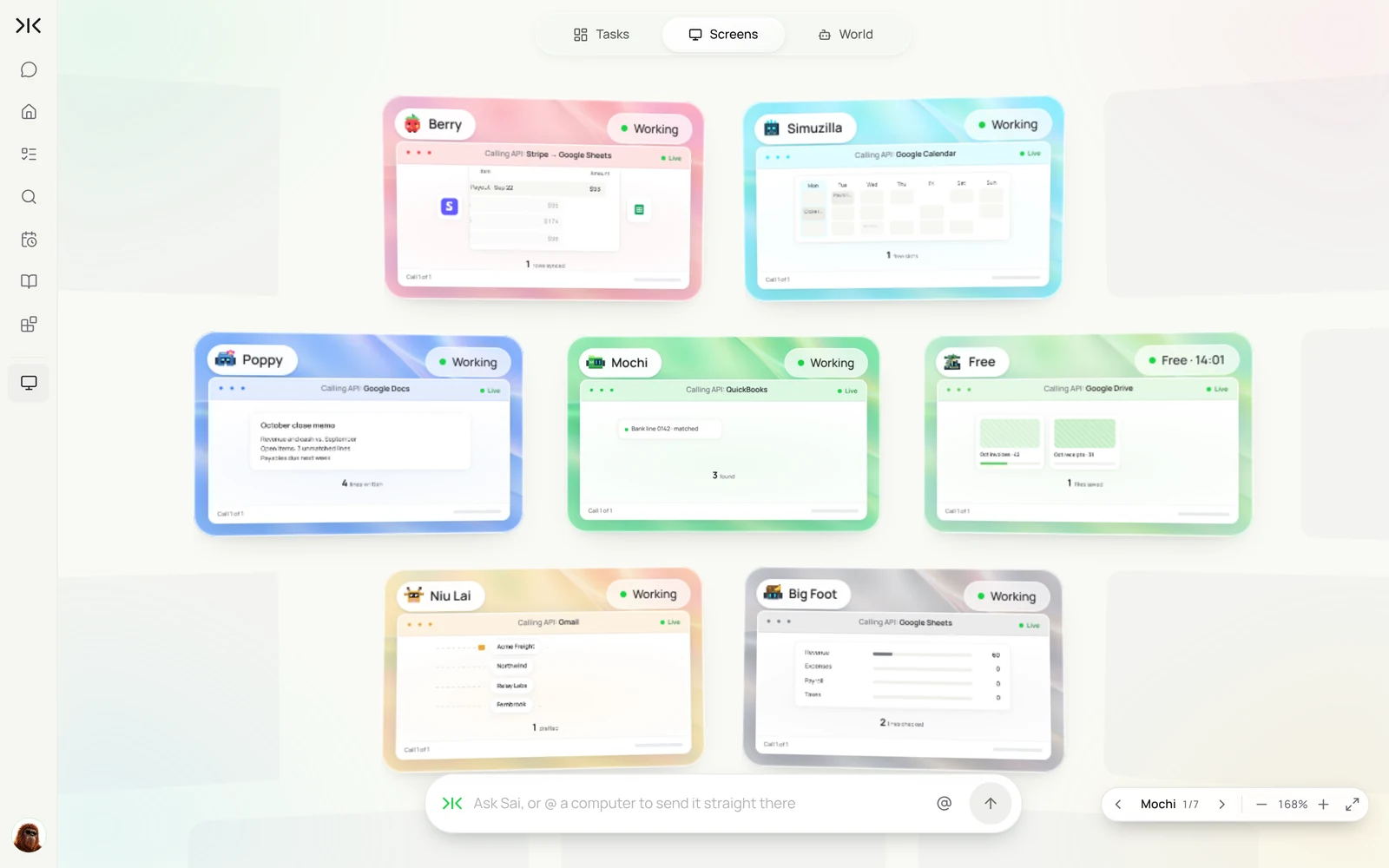
By the end of this guide you have an AI bookkeeper that keeps the books current every day, on its own cloud computers, while payments, approvals and judgment calls stay with you or your accountant. It runs six routines:
- Bills in. Every weekday, finds invoices in Gmail and vendor portals, files the PDFs in Drive and enters each bill in QuickBooks or Xero.
- Receipts matched. Every evening, matches card charges to receipts and lists what is missing.
- Categorization. Categorizes new bank and card transactions with your rules and flags anything new or unusual.
- Collections. Every Monday, lists overdue customer invoices and drafts friendly reminders.
- Month-end close. Downloads statements, reconciles bank and Stripe lines, lists open items and drafts the close memo.
- Weekly cash report. Every Friday, posts cash, burn and upcoming payables in Slack.
What is AI bookkeeping?
An AI bookkeeper is software that does the data work of bookkeeping: gathering source documents, entering and categorizing transactions, matching them to statements and preparing the close. It does not replace an accountant’s judgment or sign-off. It makes sure the books are complete and current when they look.
Sai is a good fit because much of this work lives in places without a usable API: bank portals, vendor billing pages, PDF invoices in email, and the screens of QuickBooks or Xero themselves. Sai works through those the way a bookkeeper would, and asks you whenever money moves or a security check appears. For stores, Shopify payouts can be matched the same way; see Sai × Shopify.
An AI bookkeeper is one of several AI employees teams set up with Sai; collecting invoices from vendor portals works because Sai is a computer use agent.
Where an AI bookkeeper fits
Most small businesses mix three approaches. An AI bookkeeper doesn’t replace your accounting software or your accountant; it does the work that sits between them.
| Job | By hand | Bookkeeping software rules | AI bookkeeper (Sai) |
|---|---|---|---|
| Collect invoices from email | Download and file each PDF | Only from connected sources | Reads Gmail and vendor portals, files every PDF |
| Enter bills | Type each one | OCR for uploaded files | Enters bills from any source, flags duplicates and new vendors |
| Categorize transactions | Pick a category per line | Bank rules on exact matches | Applies your rules, asks about anything new or unusual |
| Reconcile | Tick lines against statements | Suggested matches | Downloads statements, matches, lists what doesn’t match |
| Month-end close | Checklist and memo by hand | Not covered | Prepares the open items and drafts the close memo |
| Judgment and sign-off | You or your accountant | You or your accountant | Still you or your accountant |
Comparing tools for one piece of this, such as invoices or receipts? See the best invoice automation software and the best receipt scanners and organizers.
What an AI bookkeeper does, week by week
Set these up one by one. Start with bills in, which saves the most hours for most teams.
| Workflow | What Sai does | Cadence | Needs your approval |
|---|---|---|---|
| Bills in | Collects invoices from Gmail and vendor portals, files PDFs, enters bills | Weekdays 18:00 | No for entry, yes before any payment |
| Receipts matched | Matches card charges to receipts, lists missing ones | Daily 20:00 | No |
| Categorization | Applies your rules, flags new vendors and unusual amounts | Daily | Yes for new rules |
| Collections | Lists overdue customer invoices, drafts reminders | Mondays 9:00 | Yes, before sending |
| Month-end close | Downloads statements, reconciles, lists open items, drafts the memo | First business day | Yes, before closing a period |
| Weekly cash report | Posts cash, burn and upcoming payables in Slack | Fridays 16:00 | No, it is a summary |
What you need before you start
- A Sai account. The Free plan includes one cloud computer, enough to build and test each step. Running several jobs in parallel works best on Pro. See Plans, usage, and limits.
- Your bookkeeping rules. Chart of accounts, how you categorize common vendors, approval thresholds and who signs off on the close.
- Accounts Sai will use. QuickBooks or Xero, your bank’s website and vendor portals signed in on the cloud computer through Sai’s approval link; Gmail and Drive connected in Abilities → Integrations. Use a bookkeeper-level user, not an owner account, where your tools allow it.
- A Drive folder and a Close sheet for documents and open items.
Step 1: Write your Bookkeeping Rules skill
This skill is the difference between a helpful assistant and a risky one. Put your categories, thresholds and hard limits in it.
When to use it
Any task in QuickBooks, Xero, the bank portal, Stripe or finance email.

Categories
- AWS, GCP, Vercel: Hosting (6010). Figma, Notion, Slack: Software (6020).
- Meals under $75 with a receipt: Meals (6300). Above $75: ask me.

Thresholds
- Flag any bill more than 10% above the vendor's average.
- Flag any new vendor before creating it.

Never
- Pay, schedule or approve a payment.
- Change a reconciled or closed period.
- Change bank details, users or tax settings.
- Continue past a security code or login prompt. Stop and ask me.
Have your accountant read this skill once. Their corrections are the best training Sai gets.
Step 2: Get bills in every evening
Sai collects invoices from email and from the vendor portals that never email a PDF, files them and enters each one as a bill.
Every weekday at 18:00, find new vendor invoices in Gmail and in the AWS and Figma billing portals.
Save each PDF to Drive under /Finance/<Year>/<Month>.
Enter each as a bill in QuickBooks with vendor, date, due date, amount and account from my Bookkeeping Rules skill.
Flag duplicates, new vendors and amounts more than 10% above average. Never pay anything.
Every weekday at 6 PM, find new vendor invoices in Gmail and in the AWS and Figma billing portals. Save each PDF to Drive, enter it as a bill in QuickBooks with the right account, and flag duplicates or amounts that changed by more than 10%.
- 7 invoices, 2 receipts
- AWS and Figma invoices saved
- 9 files in /Finance/2026/October
- 9 bills entered, 1 flagged
Related: invoice automation with Simular and syncing Google Sheets invoices with QuickBooks.
Step 3: Match receipts and categorize transactions
Run receipt matching and categorization side by side. Each job gets its own computer, so neither waits for the other.
Every evening at 20:00, open new card and bank transactions in QuickBooks.
Categorize each one with my Bookkeeping Rules skill.
Match card charges to receipts in Gmail and Drive, and attach them.
Add a row to the Missing Receipts sheet for anything without one, with the cardholder's name.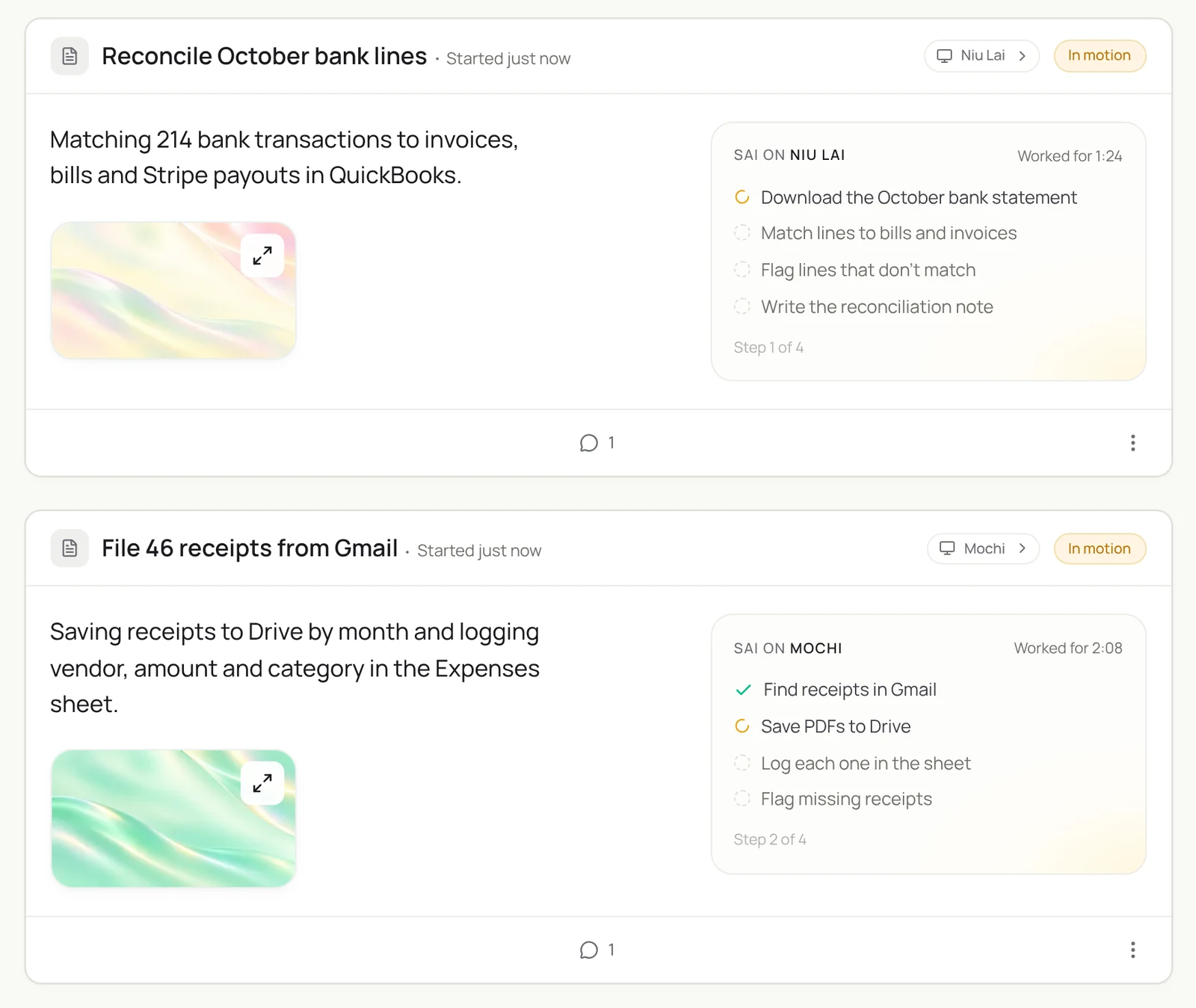
Step 4: Chase overdue invoices
Collections work best when they are consistent and polite. Sai drafts; you send.
Every Monday at 9:00, list customer invoices in QuickBooks that are more than 7 days overdue.
For each, check Gmail for any reply or promise to pay.
Draft a short, friendly reminder with the invoice attached, firmer after 30 days.
Show me the list. Do not send.
Step 5: Prepare the month-end close
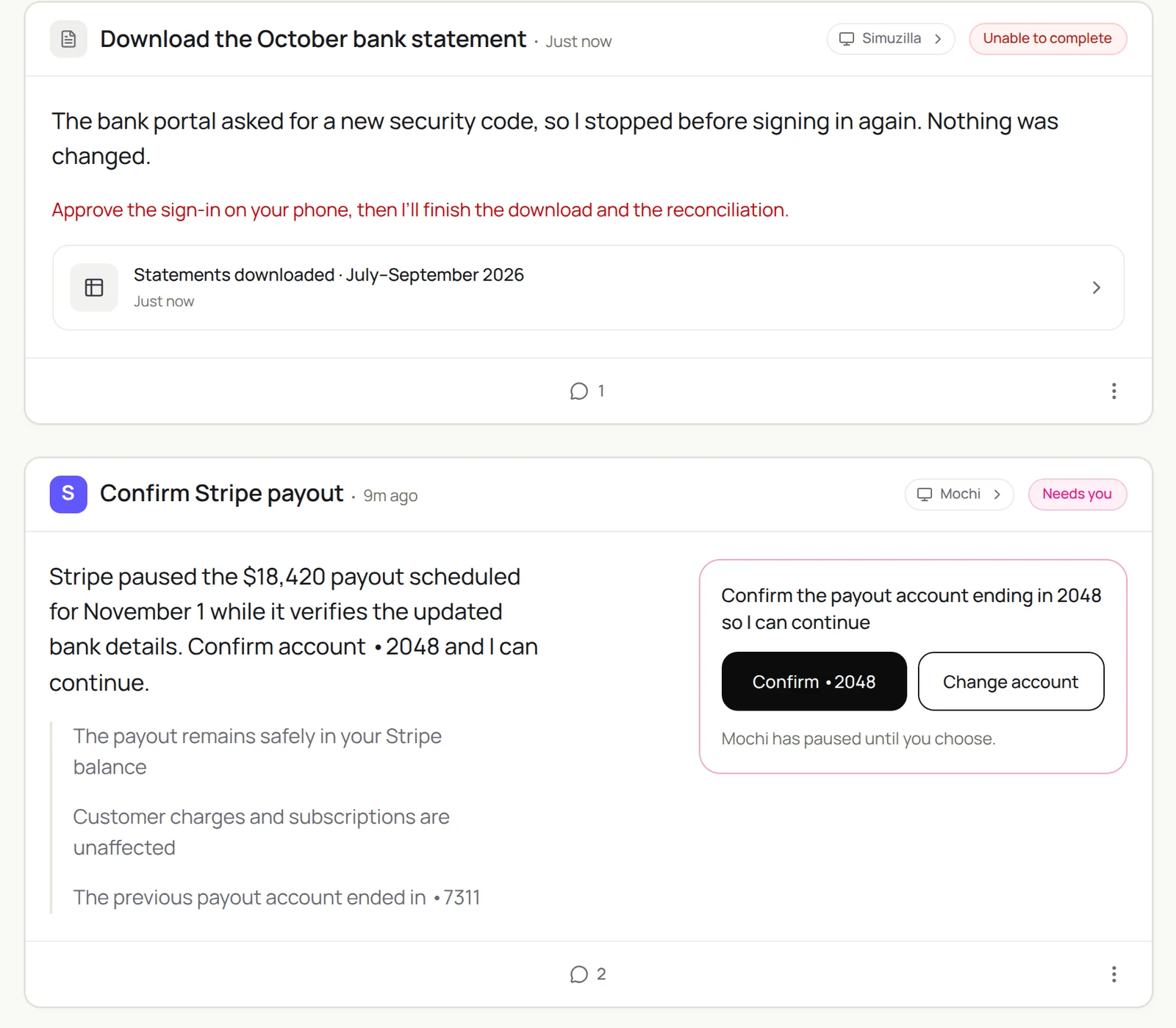
Sai does the matching and the paperwork, and stops whenever a bank asks for a code or a payment needs your decision.
On the first business day of the month, download last month's statements from our bank and Stripe.
Reconcile every line in QuickBooks. Do not change any closed period.
List anything that doesn't match in the Close sheet with a note.
Draft a one-page close memo: revenue, expenses, cash, open items.
It’s month end. Download the October statements from our bank and Stripe, reconcile every line in QuickBooks, list anything that doesn’t match in the Close sheet, and draft the close memo for me.
- Bank: 214 lines · Stripe: 4 payouts
- 211 matched, 3 open
- 3 open items with notes
- 1-page memo for review
Step 6: Send a weekly cash report
One message every Friday that a founder or CFO can read in a minute.
Every Friday at 16:00, post in #finance:
cash in each account, net burn for the last 4 weeks, runway at that burn,
bills due in the next 14 days, and overdue receivables.
Link the QuickBooks reports you used.
Step 7: Put your AI bookkeeper on a schedule
Once each task runs well by hand, make it a routine:
| Routine | When it runs | What you do |
|---|---|---|
| Bills in | Weekdays 18:00 | Review flags, approve payments yourself |
| Receipts and categories | Daily 20:00 | Answer questions on new vendors |
| Collections | Mondays 9:00 | Approve reminders |
| Month-end close | First business day | Resolve open items, sign off |
| Weekly cash report | Fridays 16:00 | Read it |
Turn on Code-Replay for portal downloads and statement imports, which repeat the same clicks every time. See Routines.
Example: one month of AI bookkeeping at a 12-person agency
An illustrative month for a services business with about 90 vendor bills, 300 card transactions and 2 bank accounts. Your numbers will differ; the shape of the change is typical.
| Task | Before (hours/month) | With an AI bookkeeper | What the owner still does |
|---|---|---|---|
| Collect and file invoices | 6 | 0.5 | Glance at flags for new vendors |
| Enter bills | 8 | 1 | Approve payments in the bank |
| Match receipts and categorize | 10 | 1.5 | Answer questions on unusual charges |
| Reconcile and close | 8 | 2 | Review open items with the accountant |
| Chase overdue invoices | 3 | 0.5 | Approve reminder emails |
| Total | 35 | 5.5 | About 1 hour a week of review |
The biggest gains come from collection and entry, where documents are scattered across email and portals.
How much does AI bookkeeping cost?
There are three parts to the cost. The first is your accounting software, which you already pay for (QuickBooks Online or Xero). The second is the agent: with Sai you can build and test every step on the Free plan, and daily routines usually need Pro at $50 a month (see Plans, usage, and limits). The third is your accountant’s review, which gets shorter when the books arrive complete.
Compare that with the time it replaces. At 6 to 10 hours a week of bookkeeping data work, even a part-time bookkeeper at $25 to $40 an hour costs $600 to $1,600 a month. An AI bookkeeper doesn’t remove the need for review, but it moves most of those hours to the agent.
Will AI replace bookkeepers?
Not the judgment part. AI bookkeeping takes over collection, entry, matching and paperwork. People keep the decisions:
- What AI does well: gathering documents from email and portals, entering and categorizing at volume, matching lines, and preparing checklists and memos.
- What stays human: approving payments, deciding how to treat an unusual transaction, closing a period, tax positions and anything an auditor will ask about.
- What changes for bookkeepers: less data entry, more review, advisory work and more clients per person. Firms already use agents to serve more clients with the same team.
AI bookkeeping for small businesses
Small businesses get the most out of AI bookkeeping, because the owner is often the bookkeeper. A good starting set:
- Week 1: bills in from Gmail, filed and entered, with nothing paid.
- Week 2: receipts matched to card charges, with a weekly list of what’s missing.
- Week 3: categorization with your rules, and questions only for new vendors.
- Month end: statements downloaded and reconciled, with open items listed for your accountant.
Templates to start from: invoice processor to Google Sheets and organize receipts and invoices automatically.
What to look for in AI bookkeeping software
Whatever you choose, check these six things before you give it access to your books.
| Check | Why it matters | How Sai handles it |
|---|---|---|
| Works with your ledger | Moving ledgers is costly | Uses QuickBooks or Xero as they are, in a browser |
| Reaches where documents live | Most invoices sit in email and vendor portals | Reads Gmail and signs in to portals you approve |
| Never moves money | Payments need a human | A rule in the skill; payments are always yours |
| Protects closed periods | Edits after close break your reports | Never edits a reconciled or closed period |
| Explains every entry | Your accountant needs a trail | Logs each entry with its source document |
| Stops at security checks | Banks ask for codes | Pauses and asks you instead of retrying |
Keep your AI bookkeeper safe
- Sai never moves money. Paying bills, approving payouts and changing bank details stay with you. Put that rule in the skill.
- Use a limited user. Give Sai a bookkeeper-level user in QuickBooks or Xero, not the owner account, where your tools allow it.
- Stop at security checks. Sai pauses on any security code or new-device prompt and asks you, instead of trying again.
- Protect closed periods. Tell Sai never to edit a reconciled or closed period. Corrections go through your accountant.
- Keep an accountant in the loop. Sai prepares the books; a qualified person reviews and signs off. This guide is not tax or accounting advice.
Why build your AI bookkeeper on Sai
It reaches the places without an API. Bank portals, vendor billing pages and PDF invoices are where bookkeeping time goes. Sai works through them like a person.
It runs jobs in parallel. Each routine can use its own cloud computer, so bills, receipts and the close move at the same time.
It gets cheaper as it repeats. With Code-Replay, the same portal downloads and imports replay as code every month.
It finishes the task. Sai ranks #1 on OSWorld, the public benchmark for agents completing real work on a real computer.
Frequently asked questions
What is AI bookkeeping?
AI bookkeeping is software that does the recurring data work of bookkeeping: collecting invoices and receipts, entering bills, categorizing transactions, reconciling accounts and preparing the month-end close. An accountant or owner still reviews and signs off.
Will AI replace bookkeepers?
AI replaces most of the data entry and matching, not the judgment. Payments, period close, tax positions and anything unusual stay with a bookkeeper or accountant, who spends more time reviewing and advising.
How much does AI bookkeeping cost?
With Sai you can build and test on the Free plan; daily routines usually need Pro at $50 a month, on top of the QuickBooks or Xero plan you already have. That compares with $600 to $1,600 a month for 6 to 10 hours a week of part-time bookkeeping.
Is AI bookkeeping good enough for taxes?
AI bookkeeping gets the records complete and categorized, which is what tax prep needs. Tax decisions and filings should still be reviewed by a qualified accountant. This guide is not tax advice.
What is an AI bookkeeper?
An AI bookkeeper is software that does the recurring data work of bookkeeping: collecting invoices and receipts, entering bills, categorizing transactions, reconciling accounts and preparing the close. An accountant still reviews and signs off.
Does Sai work with QuickBooks and Xero?
Yes. Sai uses QuickBooks Online or Xero in a browser on its own computer, signed in with the user you give it, so it can enter bills, categorize transactions and reconcile without a separate integration.
Can Sai download invoices from vendor portals?
Yes. Sai can sign in to billing pages such as AWS or Figma with the access you give it, download invoices, and file them in Drive and your accounting system.
Will Sai pay bills?
No. In this setup Sai never pays, schedules or approves payments, and never changes bank details. It prepares bills and lists what is due; you pay.
Can Sai reconcile bank accounts?
Sai can download statements, match bank and Stripe lines in QuickBooks or Xero, and list what does not match with notes. It stops at any security prompt and never edits a closed period.
Is it safe to give an AI agent access to my accounting software?
Use a limited bookkeeper-level user, keep the never-pay and never-change-bank-details rules in the skill, and have Sai stop at security checks. Review its work like you would a new bookkeeper’s.
Can Sai replace my accountant?
No. Sai keeps the books complete and current; your accountant reviews, advises and signs off, especially on tax.
How much does it cost?
You can build and test every step on the Free plan, which includes a daily allotment of computer time. Running several jobs in parallel usually needs Pro at $50 a month. See Plans, usage, and limits.
Related guides
Keep building on the same pieces.
Skills that fit this role: QuickBooks automation, NetSuite automation, invoice data extraction, accounts receivable automation, payroll automation and expense report automation.
Routines for this role: bank and credit card reconciliation and the month-end close checklist.