
QuickBooks automation: let Sai enter bills and code transactions
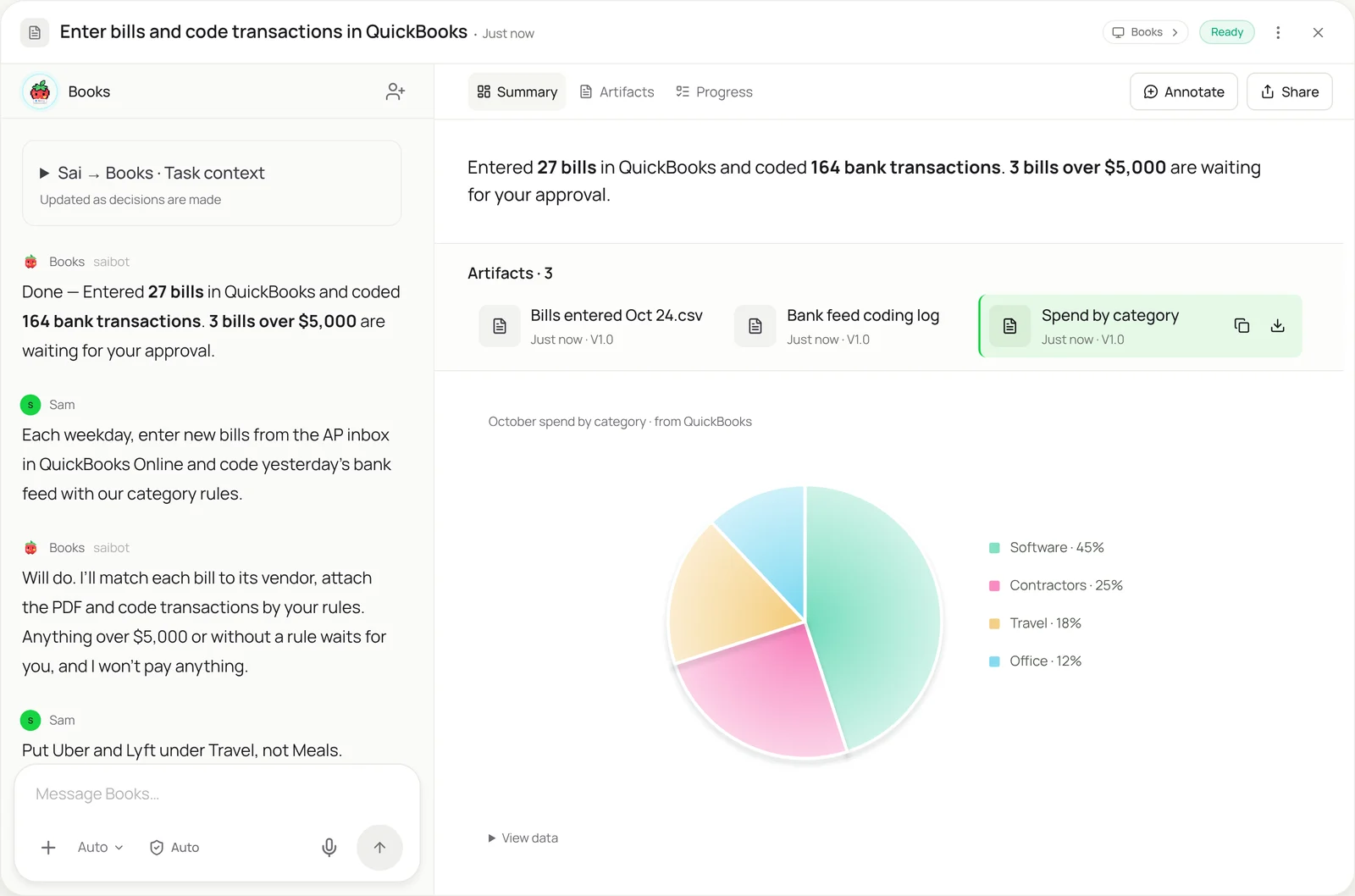
This skill gives Sai the daily QuickBooks chores your bookkeeper never has time for. Each weekday it enters new bills from the AP inbox with the PDF attached, matches receipts to card charges, and codes yesterday’s bank feed using your category rules. Anything over your approval limit, or with no rule to follow, waits for you, and Sai never pays a bill or files anything.
The skill
# Skill: QuickBooks bills and bank feed

## When to use
Daily or weekly bookkeeping in QuickBooks Online: entering vendor bills, attaching receipts, and coding transactions in the bank feed.

## Inputs
- Bills: the AP inbox (ap@) and any vendor portals in the Vendors sheet.
- Receipts: the receipts@ inbox and the Receipts folder in Drive.
- Rules: the Category rules sheet (payee or keyword -> account and class) and my approval limit ($5,000).

## How to work
1. Enter each new bill: vendor, bill number, bill date, due date, account, amount, and attach the PDF. Skip it if the vendor and bill number already exist.
2. Match receipts to card and bank transactions by amount and date (within 3 days) and attach them.
3. Code bank feed transactions using the Category rules. Use the rule's account and class only; don't pick one yourself.
4. Leave for me: bills over $5,000, new vendors, transactions with no rule, and anything that doesn't match.
5. Before saving a batch, check that totals entered equal the totals in the source documents.

## Never
- Pay, schedule or approve a payment.
- Delete, void or edit existing transactions or reconciled periods.
- Change the chart of accounts, rules or bank connections.

## Output
A list of bills entered and transactions coded, totals by category, and the items left for me with the reason for each.
What it does
- Collect bills and receipts. Sai starts on its own computer each weekday morning. It gathers new bills from the AP inbox and from vendor portals that keep invoices behind a login, as in the invoice data extraction skill, and new receipts from the receipts inbox and Drive folder. Each bill is checked against QuickBooks by vendor and bill number, so nothing is entered twice.
- Enter the bills. Each bill goes into QuickBooks Online the way your bookkeeper would enter it: vendor, bill number, dates, account, amount and line items, with the PDF attached. Sai uses the QuickBooks screens directly, so it works with your company file exactly as it is set up, including classes, locations and custom fields.
- Match receipts. Card and bank charges are matched to receipts by amount and date, and the receipt is attached to the transaction. A charge with no receipt after a few days is listed for you, so month-end doesn’t start with a hunt through inboxes. Each person’s own report can be built with expense report automation.
- Code the bank feed. Sai works through yesterday’s bank feed and codes each transaction with the account and class from your rules sheet. It never invents a category: if no rule fits, the transaction stays in the feed and goes on your list. Your corrections become new rules for the next run.
- Check and ask. Before finishing, Sai checks that the totals it entered match the source documents, then sends a short summary with spend by category. Bills over your approval limit and new vendors wait for a one-tap answer from you. Sai never pays, voids or edits closed periods.
Why it works without an API
QuickBooks rules and integrations cover the easy cases, but bills still arrive as PDFs from portals, receipts sit in inboxes, and the bank feed needs someone who knows your categories. Sai does that work through the QuickBooks screens like a bookkeeper, so it needs no connector setup, handles vendors with no integration, and follows the exact rules you write down. How computer use works.
What you get back
- Bills entered in QuickBooks with PDFs attached
- Receipts attached to their transactions
- A coded bank feed and spend by category
- A list of items waiting for your approval
Apps it uses
- QuickBooks
- Gmail
- Google Drive
- Google Sheets
Who it’s for
AI bookkeeping
Daily bookkeeping is mostly entry: bills, receipts and the bank feed. An AI bookkeeper with this skill keeps QuickBooks current every weekday, so the books are ready to reconcile at month-end and your accountant spends time on review and advice instead of typing.
- Daily bills and bank feed
- Receipt matching for card charges
- Month-end ready books
AI chief of staff
At small companies the founder often is the finance team. An AI chief of staff uses this skill to keep QuickBooks up to date, send a weekly spend summary, and bring only the big bills and odd charges to the founder for a decision.
- Weekly spend summary
- Approval of large bills
- Clean books before the board meeting
Read the AI chief of staff guide
AI e-commerce operations
Stores pay a long tail of suppliers, apps and shipping carriers, and each payout from Shopify or Amazon needs to land in the right accounts. An AI e-commerce operations agent with this skill enters supplier bills and codes payouts, fees and refunds by your rules.
- Supplier and freight bills
- Shopify and marketplace payouts
- App and fee charges coded
Read the AI e-commerce operations guide
AI executive assistant
Executives collect receipts everywhere: travel, client dinners, subscriptions. An AI executive assistant uses this skill to match each receipt to the card charge in QuickBooks and code it correctly, so expenses are done without a weekend of forwarding emails.
- Travel and meal receipts
- Subscription charges coded
- Missing receipts chased
Read the AI executive assistant guide
Common variations
- Bills from email into QuickBooks: AP inbox PDFs entered with the file attached
- Code the bank feed by rules: Yesterday’s transactions coded from your sheet
- Match receipts to card charges: Receipts attached by amount and date
- Payments received: Customer payments applied to open invoices
- QuickBooks Desktop data entry: The same chores in the Windows desktop app
- Weekly AP aging report: Open bills exported and summarized for you
Routines that use this skill
- Bank and credit card reconciliation: Match bank and card transactions to the books every week and list everything that doesn’t tie out.
- Month-end close checklist: Work through the close checklist on the first of the month: exports, schedules, tie-outs and a status note.
More skills
- Invoice data extraction: Read invoices from email and vendor portals and log vendor, amount, due date and line items in a sheet, with totals checked.
- Order entry automation: Turn emailed and PDF purchase orders into sales orders in your ERP or order system, and draft the confirmation for each customer.
- Payroll automation: Enter approved pay changes and hours into Gusto, ADP or Rippling before each run, check the preview, and leave the run for you to submit.