
Order entry automation: let Sai turn purchase orders into sales orders
This skill takes over the order desk’s morning: the purchase orders that arrive as PDFs, spreadsheets and plain emails. Sai reads each one, matches every line to your item codes and price list, enters the sales order in your ERP or order system, and drafts the confirmation for the customer. Lines that don’t match, prices that differ from the contract, and items short on stock are flagged for you, and nothing reaches a customer until you confirm.
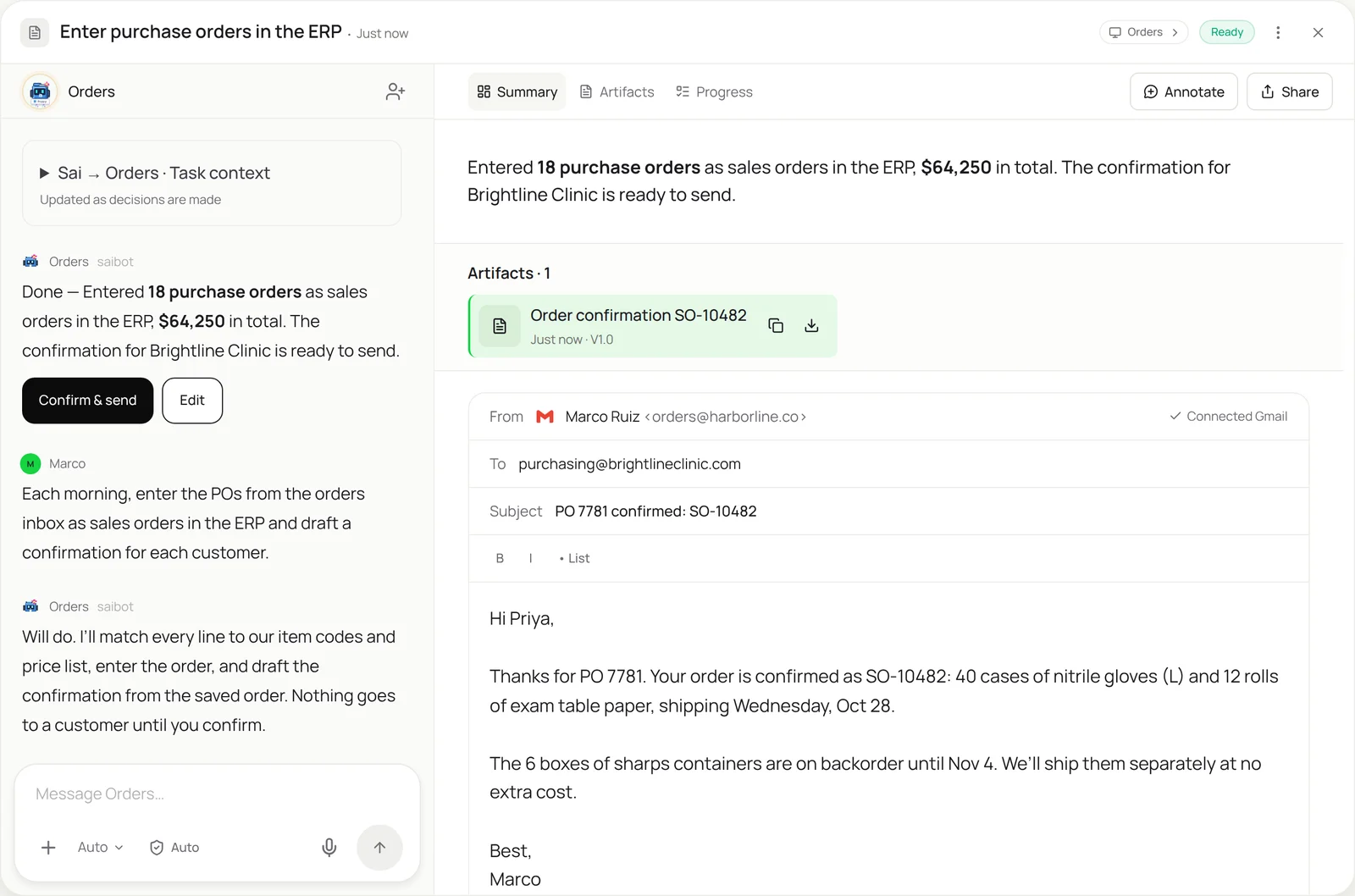
The skill
# Skill: Enter purchase orders

## When to use
Turning customer purchase orders into sales orders: POs that arrive by email as PDF, Excel, CSV or plain text, or through a customer portal.

## Inputs
- Where POs arrive: the orders@ inbox and any customer portals in the Customers sheet.
- The order system: which ERP or order app, and the screen used for new sales orders.
- Reference data: the Item map tab (customer part numbers -> our item codes) and the contract price list.

## How to enter
1. Collect POs received since the last run. Skip any PO number already entered for that customer.
2. Read the header: customer, PO number, PO date, ship-to address, requested date, terms.
3. Map each line to our item code using the Item map. Check quantity, unit of measure and price against the contract.
4. Enter the sales order with the PO number in the customer reference field. Save and read back the sales order number.
5. Check stock. For short items, note the next available date.
6. Draft a confirmation email from the saved order: order number, lines, ship date, and any backorders.

## Never
- Send a confirmation, change a price or create a new item without my approval.
- Edit or cancel orders that are already in the system.
- Enter a line I haven't mapped. Leave it for me with the PO attached.

## Output
Sales orders entered with their numbers, confirmation drafts ready to send, and a list of exceptions.
What it does
- Collect the purchase orders. Sai checks the orders inbox and the customer portals listed in your Customers sheet. Every PO is checked against the system by customer and PO number before anything is entered, so a PO sent twice, or sent once and then re-sent with a reminder, becomes one order.
- Read every line. POs arrive in every format: a PDF from one customer’s ERP, a spreadsheet from another, a plain email from a third. Sai reads each the way your order desk does, pulling the header and every line, with quantities and units. It works like the invoice data extraction skill, but in the other direction.
- Match items and prices. Each line is mapped to your item code using the customer’s part number, then checked against the contract price list and unit of measure. A part number Sai hasn’t seen, or a price that differs from the contract, stops that line and comes to you as a one-tap question instead of being guessed.
- Enter the sales order. Sai opens your ERP or order system and enters the order through the same screens your team uses, with the PO number as the customer reference. It works in web apps and desktop ERPs alike. If your system is SAP GUI, the SAP GUI automation skill covers VA01, and for smaller teams the order can go into QuickBooks.
- Draft the confirmation. After saving, Sai reads back the sales order number, checks stock for each line and drafts a confirmation email from the saved order, including any backorders and their dates. You review and press send. Nothing goes to a customer without your OK.
Why it works without an API
Order entry stays manual because every customer sends POs differently and most order systems have no inbound integration for them. EDI covers only the biggest accounts. Sai reads any PO format and types the order into your system through the screen, like your order desk does, so it works with the ERP you already run and needs no connector project. See how computer use agents compare. How computer use works.
What you get back
- Sales orders entered, each with its number
- Confirmation drafts ready for you to send
- Backorders and ship dates noted
- Exceptions listed with the PO attached
Apps it uses
- Gmail
- ERP or order system
- Google Sheets
- Google Drive
Who it’s for
AI e-commerce operations
Wholesale and B2B orders arrive outside the storefront: emailed POs from retailers, spreadsheets from distributors. An AI e-commerce operations agent with this skill enters them in the order system with the right prices and ship dates, so wholesale doesn’t wait behind online orders.
- Wholesale POs from retailers
- Distributor reorder sheets
- Backorder dates for each customer
Read the AI e-commerce operations guide
AI customer support agent
Customers email to place, change and chase orders, and support teams end up doing order entry. An AI customer support agent uses this skill to turn order emails into sales orders and reply with a confirmation draft, so agents spend their time on real problems.
- Order emails into the system
- Confirmation and status replies
- Changes flagged for approval
Read the AI customer support agent guide
AI bookkeeping
In small companies the bookkeeper often enters orders so invoices can go out. An AI bookkeeper with this skill enters each order with the right terms and prices, so invoicing from the order is accurate and nothing billable is missed.
- Orders entered with terms
- Prices checked before invoicing
- Order totals for the books
AI RevOps manager
Closed deals become orders, and the hand-off is where numbers get retyped wrong. An AI RevOps manager uses this skill to enter orders from signed quotes and POs with the CRM deal attached, so bookings in the CRM and orders in the ERP match.
- Orders from signed quotes
- Bookings matched to the CRM
- Exceptions back to the deal owner
Read the AI RevOps manager guide
Common variations
- Sales orders in SAP: VA01 from emailed POs
- Orders into QuickBooks: Sales orders or invoices from POs
- POs from a customer portal: Orders downloaded from a supplier portal
- Sales orders in NetSuite: Customer POs entered as NetSuite sales orders
- Order changes and cancellations: Changes drafted for your approval
- Records for any system: The same method for other inbound documents
Routines that use this skill
- Shopify inventory report: Read stock levels through your Shopify app connection every morning, flag low-stock products and draft the reorder list.
More skills
- SAP GUI automation: Run repetitive SAP transactions through the GUI from a work list, with a screenshot of every posting and a stop on every exception.
- Automated data entry: Copy records from forms, PDFs and emails into portals, CRMs and sheets, field by field, with every entry checked and logged.
- NetSuite automation: Enter vendor bills in NetSuite from the PO and receipt, attach the PDF and leave each one Pending Approval, with mismatches left for you.