
NetSuite automation: let Sai enter and match vendor bills
This skill takes the typing out of accounts payable in NetSuite. Each morning Sai reads new vendor bills from the AP inbox, finds the purchase order and item receipt in NetSuite, enters the bill from the PO so lines and accounts carry over, attaches the PDF and leaves it Pending Approval. Bills outside your price tolerance, vendors with look-alike records and anything without a match come to you, and Sai never approves or pays.
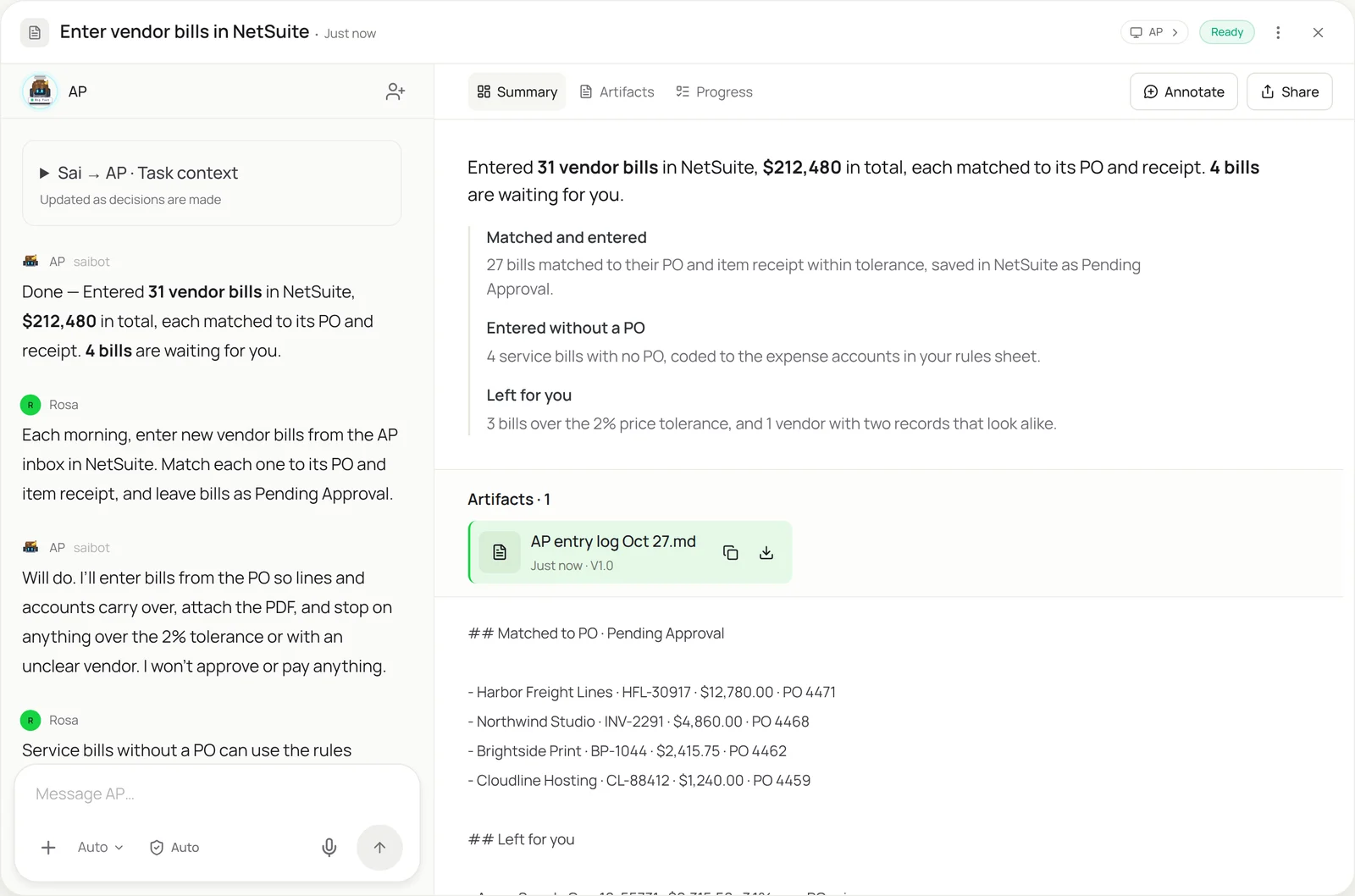
The skill
# Skill: NetSuite vendor bills

## When to use
Entering vendor bills in NetSuite: the daily AP inbox, bills downloaded from vendor portals, or a backlog at month-end.

## Inputs
- Where bills arrive: the AP inbox (ap@) and vendor portals in the Vendors sheet.
- NetSuite: the role Sai signs in with (AP clerk, no approval rights) and the subsidiary.
- Rules: price tolerance (2%), quantity tolerance (0), and the Rules sheet for service bills without a PO.

## How to enter
1. Collect bills received since the last run. Skip any vendor + bill number already in NetSuite.
2. Find the vendor record. If two records could match, stop and ask me which one.
3. For PO bills: open the purchase order, use Bill from the PO, and check each line against the bill and the item receipt.
4. For bills without a PO: code lines with the account, department and class from the Rules sheet.
5. Enter bill number, date, due date and terms from the document, attach the PDF, and save as Pending Approval.
6. Leave for me: price or quantity over tolerance, no item receipt, no PO and no rule, or a new vendor.

## Never
- Approve, pay or schedule a payment.
- Create or edit vendors, items or accounts.
- Edit bills that are already approved or in a closed period.

## Output
Bills saved as Pending Approval with the PDF attached, a log of what was entered, and the list of bills left for me with the reason.
What it does
- Collect the bills. Sai starts each morning on its own computer and gathers new bills from the AP inbox and from vendor portals that keep invoices behind a login. Each one is checked against NetSuite by vendor and bill number before anything is entered, so a bill sent twice becomes one entry. Reading the PDFs works like the invoice data extraction skill.
- Find the vendor and PO. In NetSuite, Sai finds the vendor record and the open purchase order the bill refers to, and checks for an item receipt. If two vendor records could be the same company, it doesn’t pick one; it asks you, because posting to the wrong vendor is hard to undo.
- Enter the bill from the PO. For PO bills, Sai uses NetSuite’s Bill from the PO, so items, accounts, departments and classes carry over exactly as purchasing set them. It compares each line’s price and quantity with the bill and the receipt, and anything over your tolerance stops that bill instead of being adjusted.
- Code bills without a PO. Service bills, subscriptions and utilities often have no PO. Sai codes them with the account, department and class from your Rules sheet, and if no rule fits, the bill waits for you rather than going to a suspense account by guess.
- Attach, save and report. Every bill gets its PDF attached and is saved as Pending Approval, so your normal approval workflow in NetSuite stays in charge. You get a log of what was entered and a short list of bills that need you, each with the reason. Sai never approves or pays, and it works with the same screens as your AP team, alongside other ERPs like SAP.
Why it works without an API
NetSuite AP automation usually means an OCR add-on, a SuiteScript project or a connector that needs configuring per vendor and breaks on unusual layouts. Sai reads any bill and enters it through the NetSuite screens with an AP clerk role, the way your team does, so it needs no scripting and follows your approval workflow as it is. See how Sai compares with invoice automation tools. How computer use works.
What you get back
- Bills in NetSuite, Pending Approval, with PDFs attached
- A log of every bill entered
- Exceptions listed with the reason
- Duplicate and look-alike vendor checks
Apps it uses
- NetSuite
- Gmail
- Google Drive
- Google Sheets
Who it’s for
AI bookkeeping
For companies on NetSuite, AP entry is the biggest daily bookkeeping job. An AI bookkeeper with this skill keeps bills current every morning, matched to POs and receipts, so the controller reviews exceptions instead of typing, and month-end AP accruals start from a complete list.
- Daily vendor bill entry
- Three-way match on PO bills
- Month-end AP completeness
AI chief of staff
Growing companies move to NetSuite before they have a full AP team. An AI chief of staff uses this skill to keep bills entered and coded while the finance team is small, and to bring only the exceptions and approvals to the people who own them.
- Bill entry while the team is small
- Approvals routed, not decided
- Weekly AP summary
Read the AI chief of staff guide
AI e-commerce operations
Brands on NetSuite receive bills from suppliers, 3PLs and freight carriers every day. An AI e-commerce operations agent with this skill enters them against the right POs and receipts, so landed costs and inventory valuation stay accurate.
- Supplier and 3PL bills
- Freight bills against POs
- Receipts checked before billing
Read the AI e-commerce operations guide
AI project manager
Project-based firms on NetSuite need contractor and vendor bills coded to the right project. An AI project manager uses this skill to enter each bill with the project and class from the PO, and to flag bills that would put a project over budget.
- Contractor bills by project
- Class and department coding
- Over-budget bills flagged
Read the AI project manager guide
Common variations
- AP bills from the inbox: Daily vendor bills matched to POs
- Bills from vendor portals: Downloaded, then entered the same way
- Sales orders from customer POs: The order desk side of NetSuite
- Journal entries from a sheet: Recurring entries typed from a template
- Customer payments in NetSuite: Cash applied to open invoices
- Smaller teams on QuickBooks: The same AP job in QuickBooks Online
Routines that use this skill
- Bank and credit card reconciliation: Match bank and card transactions to the books every week and list everything that doesn’t tie out.
- Month-end close checklist: Work through the close checklist on the first of the month: exports, schedules, tie-outs and a status note.
More skills
- Invoice data extraction: Read invoices from email and vendor portals and log vendor, amount, due date and line items in a sheet, with totals checked.
- Order entry automation: Turn emailed and PDF purchase orders into sales orders in your ERP or order system, and draft the confirmation for each customer.
- Accounts receivable automation: Apply customer payments to open invoices from bank portals and remittance emails, and draft reminders for overdue accounts.