
Accounts receivable automation: let Sai apply payments and chase invoices
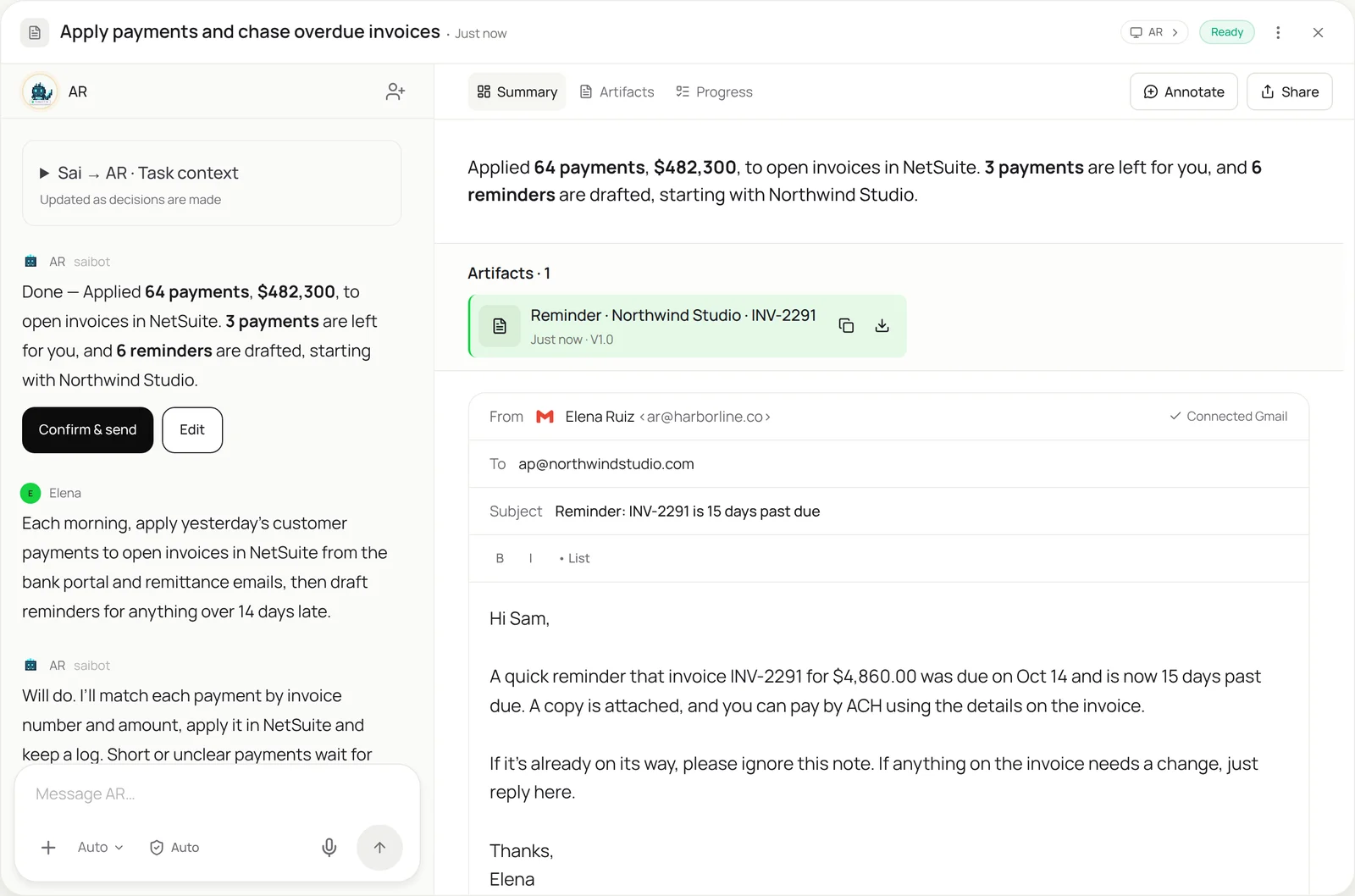
This skill takes over the two daily AR chores: cash application and collections. Each morning Sai reads yesterday’s deposits in your bank portal and the remittance emails that explain them, matches each payment to its open invoices, and applies it in your accounting system. Then it drafts a polite reminder for every invoice past your threshold. Short payments and anything unclear come to you, and reminders stay as drafts until you send them.
The skill
# Skill: Cash application and collections

## When to use
Daily accounts receivable work: applying customer payments to invoices, and following up on overdue invoices.

## Inputs
- Payments: deposits in the bank portal, card and ACH processor reports, and remittance emails in ar@.
- The accounting system: NetSuite, QuickBooks or Xero, with an AR role that cannot void or write off.
- Rules: the reminder threshold (14 days), reminder templates, and accounts excluded from reminders (payment plans, disputes).

## How to apply cash
1. List yesterday's deposits. Find the remittance for each in ar@ or the bank's payment details.
2. Match each payment to open invoices by invoice number, then by exact amount and customer.
3. Apply it in the accounting system and attach the remittance.
4. Leave for me: short or over payments, payments with no clear invoice, and anything that would need a write-off or credit.

## How to collect
1. List invoices past the threshold, skipping excluded accounts.
2. Draft a reminder from the template with the invoice attached, addressed to the customer's AP contact.
3. Leave reminders as drafts. Never send.

## Never
- Write off, void or credit invoices, or change invoice amounts.
- Send emails or call customers.
- Touch accounts in dispute.

## Output
Payments applied with remittances attached, reminder drafts ready to review, and the list of exceptions.
What it does
- Collect yesterday’s payments. Sai signs in to your bank portal and processor dashboards and lists every deposit from yesterday, then finds the remittance for each: the email from the customer’s AP team, the details on the ACH, or the PDF they attached. Banks rarely offer small businesses an API for this, so reading the portal is the practical route.
- Match payments to invoices. Each payment is matched to open invoices by invoice number first, then by exact amount and customer. One payment can cover several invoices, and Sai splits it the way the remittance says. Payments that don’t match exactly, like $2,400 against a $2,415.75 invoice, come to you as a question.
- Apply the cash. Sai applies each matched payment in your accounting system, NetSuite, QuickBooks or Xero, with the remittance attached, using an AR role that can’t void or write off. On NetSuite it works alongside the NetSuite automation skill; on QuickBooks, alongside QuickBooks automation.
- Draft the reminders. Next Sai lists invoices past your threshold, skips accounts on payment plans or in dispute, and drafts a reminder for each from your template, with the invoice attached and the right AP contact. Reminders stay as drafts until you press send.
- Report and repeat. You get a short summary: cash applied, exceptions with the reason for each, and reminders ready to send. It runs every morning as a routine, so the AR aging is current before anyone opens it.
Why it works without an API
Cash application tools need bank feeds and remittance formats they recognize, and they leave the hard cases, like emailed remittances and short payments, to people. Sai reads the bank portal and the remittance emails the way your AR clerk does and applies cash through the accounting system’s screens, so it works with the bank and system you already have. See how Sai compares with invoice automation tools. How computer use works.
What you get back
- Payments applied with remittances attached
- Reminder drafts for overdue invoices
- Exceptions listed with the reason
- A daily AR summary
Apps it uses
- Bank portal
- NetSuite or QuickBooks
- Gmail
- Google Sheets
Who it’s for
AI bookkeeping
Cash application is daily bookkeeping that never stops. An AI bookkeeper with this skill applies every payment the morning after it lands and keeps the AR aging accurate, so month-end starts with cash already matched.
- Daily cash application
- Accurate AR aging
- Exceptions for review
AI customer success manager
Overdue invoices are often a signal about the account. An AI customer success manager uses this skill to see which customers are late, draft a friendly reminder and flag accounts where a late payment might mean a renewal risk.
- Overdue accounts flagged
- Friendly reminders drafted
- Renewal risk signals
Read the AI customer success manager guide
AI chief of staff
For a small company, collections are cash flow. An AI chief of staff uses this skill to keep the receivables current, draft the reminders nobody wants to write, and report what’s outstanding each week.
- Weekly cash report
- Reminders drafted on time
- Large overdue invoices escalated
Read the AI chief of staff guide
AI RevOps manager
Revenue isn’t done until it’s collected. An AI RevOps manager with this skill connects invoices and payments back to the CRM, so account owners see who has paid and bookings match cash.
- Payments matched to deals
- Account owners notified
- Bookings versus cash
Read the AI RevOps manager guide
Common variations
- Cash application: Deposits matched and applied every morning
- Collections reminders: Overdue invoices with drafted reminders
- Invoices into customer portals: Invoices uploaded where customers require it
- Remittances from email: Remittance details read from AP emails
- AR in QuickBooks: Payments received entered in QuickBooks Online
- Weekly AR aging report: Aging exported and summarized for you
More skills
- NetSuite automation: Enter vendor bills in NetSuite from the PO and receipt, attach the PDF and leave each one Pending Approval, with mismatches left for you.
- QuickBooks automation: Enter bills, attach receipts and code bank transactions in QuickBooks Online by your rules, with big bills and unknowns left for you.
- Invoice data extraction: Read invoices from email and vendor portals and log vendor, amount, due date and line items in a sheet, with totals checked.