
Payroll automation: let Sai enter payroll changes before every run
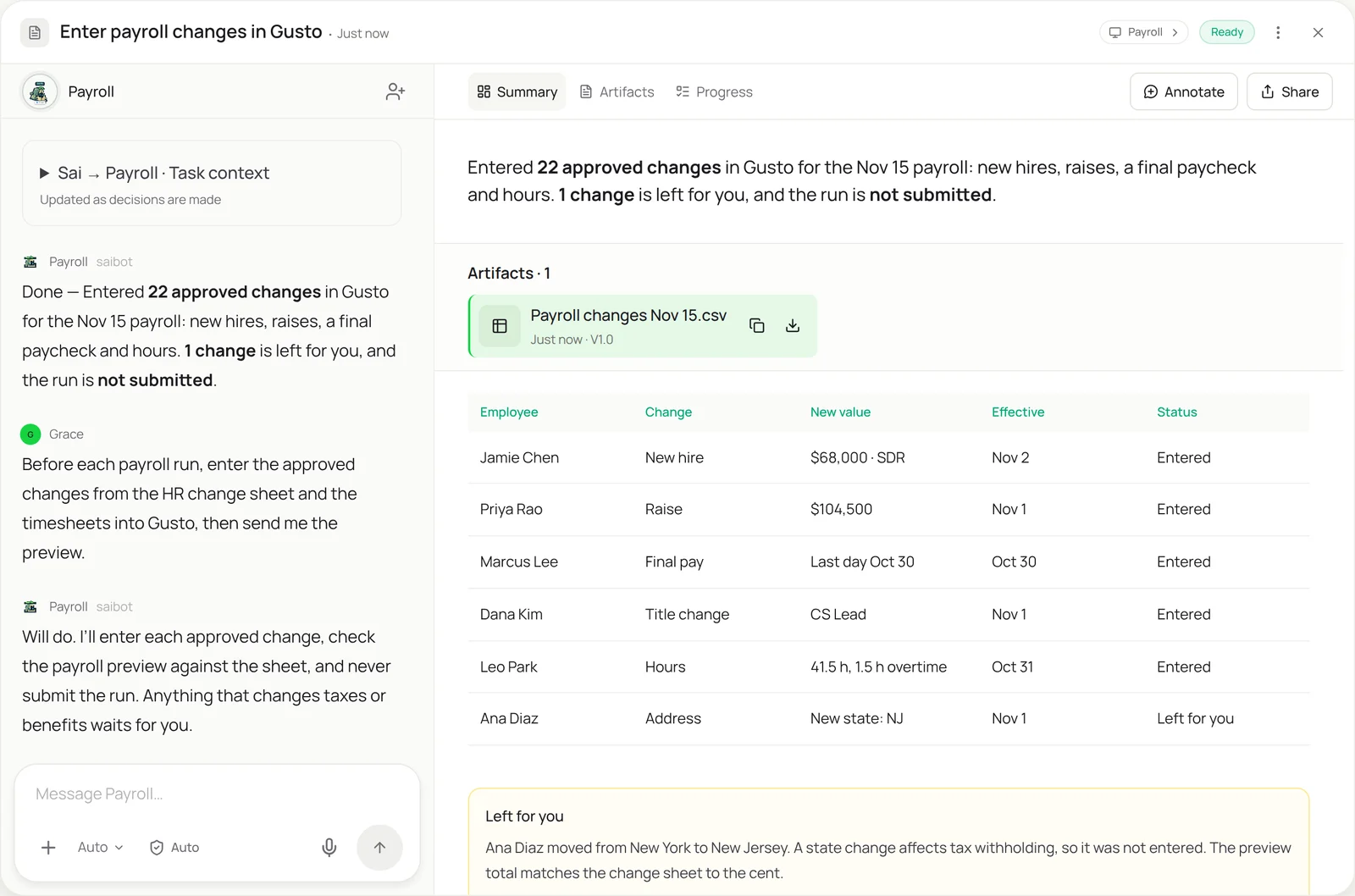
This skill handles the data entry before every payroll: new hires, raises, final paychecks, title changes and the hours from timesheets. Sai enters each approved change in your payroll provider, checks the payroll preview against your change sheet to the cent, and leaves the run for you to submit. Anything that touches taxes, benefits or bank details waits for you.
The skill
# Skill: Payroll changes

## When to use
Before each payroll run: entering approved changes and hours into the payroll provider, and checking the preview.

## Inputs
- Changes: the HR change sheet with only approved rows (new hires, raises, terminations, title changes, bonuses), each with an effective date.
- Hours: approved timesheets for hourly staff, from the time-tracking tool or sheet.
- The payroll provider: Gusto, ADP or Rippling, with a role that can edit employee pay but cannot submit payroll.

## How to enter
1. Take only approved rows with an effective date in this pay period.
2. For each, open the employee in the payroll provider and enter the change exactly as approved. Save and read the new value back.
3. Enter hours and overtime for hourly staff only, from approved timesheets.
4. Open the payroll preview. Check gross pay per employee and the total against the change sheet. They must match to the cent.
5. Leave for me: anything that changes tax withholding, benefits, garnishments, state or bank details.

## Never
- Submit or approve a payroll run.
- Enter bank details, tax forms or benefit elections.
- Enter a change that isn't approved in the sheet.

## Output
Changes entered, a preview check against the sheet, and the list of items for me. The run is left unsubmitted.
What it does
- Gather approved changes. Sai starts from your HR change sheet and takes only approved rows with an effective date in this pay period: new hires, raises, final paychecks, title changes, bonuses. It pulls approved hours from your time-tracking tool or timesheet. Unapproved rows are ignored, not guessed at.
- Enter each change. For every change, Sai opens the employee in your payroll provider, Gusto, ADP or Rippling, and enters it exactly as approved, with the effective date. After saving, it reads the new value back to confirm it took. It works through the provider’s screens with a role that can edit pay but can’t run payroll.
- Enter hours. Hours and overtime are entered for hourly staff only, from approved timesheets. Salaried staff are left as they are. If a timesheet is missing or not approved, that person is flagged rather than paid from last period’s hours.
- Check the preview. Before handing over, Sai opens the payroll preview and checks gross pay for each employee and the total against the change sheet. They must match to the cent. Changes that affect tax withholding, benefits or bank details, like a move to a new state, are left for you.
- Hand it to you. You get a short summary of what was entered, the preview check, and the items waiting for you. The run is never submitted by Sai. New hires come in already set up by employee onboarding automation, and payroll journals can be posted with QuickBooks automation.
Why it works without an API
Payroll providers have APIs, but they’re built for partner integrations, not for a small team’s change sheet, and most changes still get typed in by hand before each run. Sai enters them through the provider’s screens the way your payroll admin does and checks the preview, so the only step left for you is the one that should be yours: approving the run. Sai ranks at the top of OSWorld, the open benchmark for computer use. How computer use works.
What you get back
- Approved changes entered and read back
- Hours entered for hourly staff
- A preview check against the change sheet
- Tax and benefit items left for you
Apps it uses
- Gusto, ADP or Rippling
- Google Sheets
- Gmail
- Excel
Who it’s for
AI bookkeeping
For many small companies the bookkeeper runs payroll too. An AI bookkeeper with this skill enters every approved change and checks the preview before each run, so payroll goes out right and the journal entry matches.
- Changes entered before each run
- Preview checked to the cent
- Payroll journal support
AI recruiter
Every hire ends with a payroll setup. An AI recruiter uses this skill so each new hire’s approved salary and start date reach payroll on time, without retyping the offer letter.
- New hires into payroll
- Start dates and salaries from offers
- Final checks before the first run
AI chief of staff
Founders often run payroll themselves until the first finance hire. An AI chief of staff with this skill does the data entry and the check, and leaves only the approval to the founder.
- Payroll prep for founders
- Raises and bonuses entered
- Run approval left to you
Read the AI chief of staff guide
AI project manager
Teams with hourly staff or contractors depend on timesheets reaching payroll correctly. An AI project manager uses this skill to make sure approved hours by project are entered before each run.
- Approved hours into payroll
- Overtime for hourly staff
- Missing timesheets chased
Read the AI project manager guide
Common variations
- Changes in Gusto: Raises, hires and terminations before each run
- Hours from timesheets: Approved hours and overtime for hourly staff
- ADP or Rippling: The same job in another payroll provider
- New hire payroll setup: Approved offers into payroll
- Payroll preview check: Gross pay checked against the change sheet
- Payroll journal entry: The payroll summary posted to the books
Routines that use this skill
- Timesheet reminders: Check who hasn’t submitted a timesheet before payroll and draft a friendly reminder for each person.
More skills
- Employee onboarding automation: Set up a new hire’s accounts, groups and requests across your admin consoles from one checklist, and undo it all at offboarding.
- Excel automation: Clean, merge and update workbooks, refresh a model from new numbers, and build the weekly report in the real Excel app.
- QuickBooks automation: Enter bills, attach receipts and code bank transactions in QuickBooks Online by your rules, with big bills and unknowns left for you.