
Website data to Excel or Google Sheets: let Sai collect it on a schedule
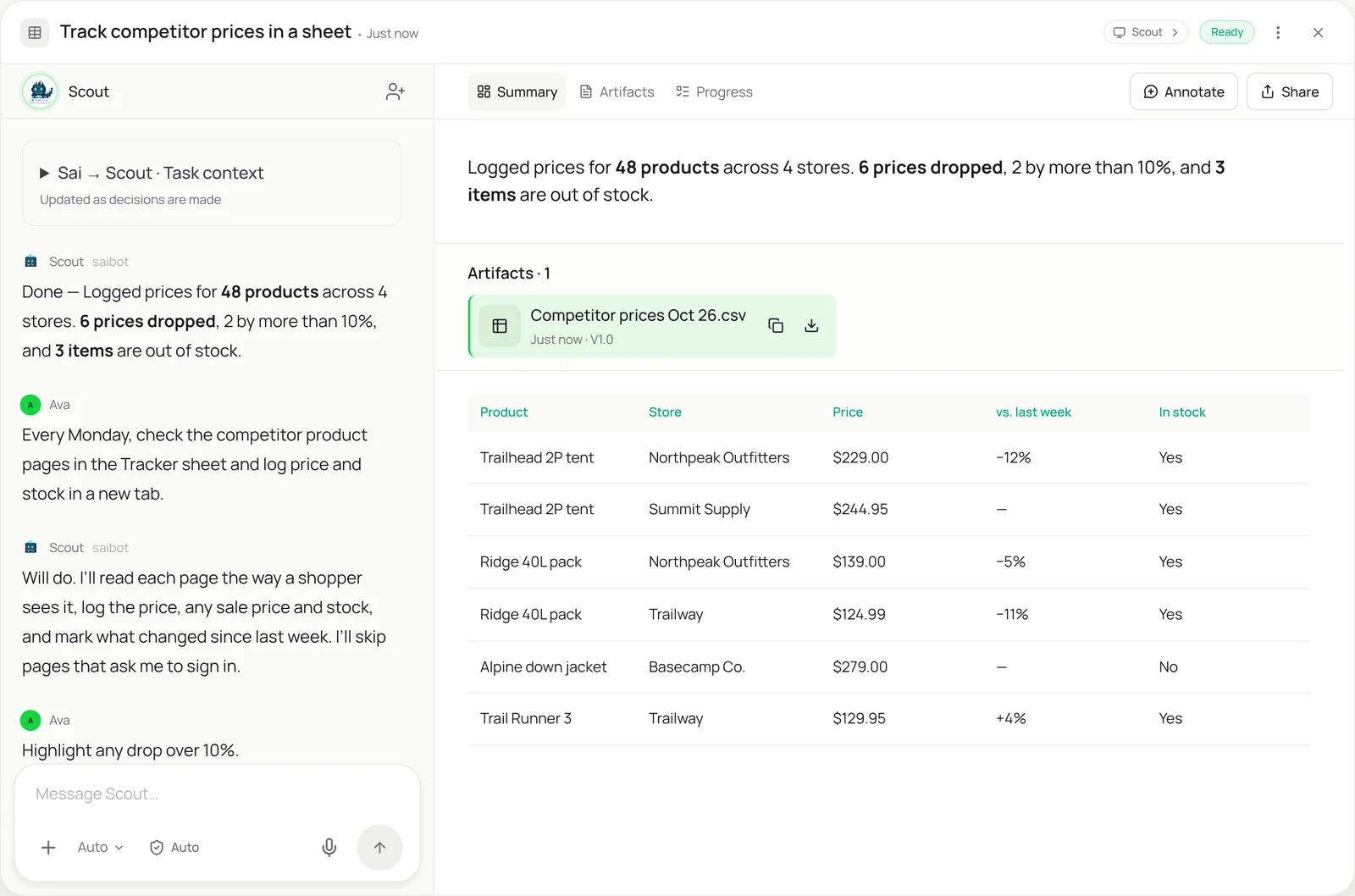
This skill is for the numbers that only live on web pages: competitor prices, supplier stock, product listings, review counts, open roles. Sai opens each page in a real browser, reads it the way a person does, and logs the values in your Google Sheet or Excel file, with what changed since last time. It handles pages that need scrolling, clicking “load more” or picking a size, and it skips anything behind a login you haven’t approved.
The skill
# Skill: Website data to a sheet

## When to use
Any task that copies values from web pages into a spreadsheet by hand: competitor prices, supplier stock, listings, review counts, job posts, event lists.

## Inputs
- The pages: the URL list in the Sources tab, with what to read on each (price, sale price, stock, rating, count).
- The sheet: Google Sheets or Excel file, which tab to write to, and the column order.

## How to collect
1. Open each URL in the browser. Wait for the page to load fully. Accept only necessary cookies.
2. If a value needs a click (size, region, "load more"), do it the same way every run, as listed in the Sources tab.
3. Read the value as shown on the page. Write numbers without currency symbols, dates as YYYY-MM-DD.
4. Add one row per item per run with the date and URL. Never overwrite earlier rows.
5. Compare with the last run and mark changes. Highlight price drops over 10%.
6. If a page fails to load, needs a login, shows a captcha, or its layout changed, skip it and list it for me.

## Never
- Sign in, create accounts or solve captchas.
- Collect personal data about individuals.
- Visit more than one page every few seconds on the same site, or ignore a site's terms.

## Output
New rows in the sheet, a short summary of what changed, and the pages that need my attention.
What it does
- Open each page. Sai starts from the list of pages in your Sources tab and opens each one in a real browser on its own computer. Because it sees the page as rendered, it works on sites built with JavaScript, single-page apps and pages that only show prices after you pick a size or region. It accepts only necessary cookies and paces itself so no site gets hammered.
- Find the values. On each page Sai reads exactly what you listed: price, sale price, stock, rating, review count, number of open roles. It follows the same clicks every run, such as choosing the size or pressing “load more”, so results are comparable week to week. If a value isn’t on the page, it writes nothing rather than guessing.
- Write to your sheet. Values go into your Google Sheet or Excel file as one row per item per run, with the date and the source URL, so you build a history instead of overwriting it. Numbers are written as numbers and dates in one format, so charts and formulas work straight away. If you’d rather keep it in Excel, the Excel automation skill can take the file from there.
- Compare and flag. Sai compares each value with the previous run and marks what changed: new lows, price rises, items out of stock, roles added or removed. Anything over your threshold, like a drop of more than 10%, is highlighted, so the summary tells you what to look at instead of making you scan the whole sheet.
- Report and schedule. At the end you get a short summary and a list of pages that failed, needed a login or changed layout. Once it works, the same check runs on its own as a routine, every Monday or every morning, and results land in the sheet your team already uses in Google Workspace.
Why it works without an API
Most sites have no export and no API for the data you need, and spreadsheet formulas like IMPORTXML only read simple, static HTML. They break on pages built with JavaScript, behind a size picker or a “load more” button. Sai reads the page the way you do in a real browser, so it works on modern sites without a scraper to build or maintain. Simular’s guide to importing live web data into Google Sheets compares the options. How computer use works.
What you get back
- New dated rows in your Google Sheet or Excel file
- A summary of what changed since the last run
- Highlights for changes over your threshold
- A list of pages that failed or need you
Apps it uses
- Chrome
- Google Sheets
- Excel
- Google Drive
Who it’s for
AI e-commerce operations
Pricing and stock decisions depend on what competitors and suppliers show today. An AI e-commerce operations agent with this skill checks rival product pages and supplier portals every morning and logs price and availability, so repricing starts from facts instead of a few manual spot checks.
- Competitor price tracking
- Supplier stock and lead times
- Marketplace listing checks
Read the AI e-commerce operations guide
AI research analyst
Research tables are often built from dozens of web pages: pricing pages, feature lists, store locators, public directories. An AI research analyst uses this skill to collect those values into one comparable sheet, with the source URL on every row so each number can be checked.
- Pricing and feature comparisons
- Store and location counts
- Public directory data
Read the AI research analyst guide
AI lead generation
Buying signals are scattered across company websites: new locations, open roles, product launches. An AI lead generation agent uses this skill to watch target accounts’ pages and log changes in a sheet, then hands the rows to automated data entry to update the CRM.
- Hiring pages of target accounts
- New locations and launches
- Event and sponsor lists
Read the AI lead generation guide
AI SEO content marketer
Content teams track rankings, competitor pages and review counts that no tool exports in the form they want. An AI SEO content marketer with this skill logs competitor page changes and review counts each week, so content priorities follow what is actually moving.
- Competitor page changes
- Review counts and ratings
- SERP features to a sheet
Read the AI SEO content marketer guide
Common variations
- Competitor prices into a sheet: Product pages checked every Monday
- A web table into Excel: Any HTML table to a clean workbook
- Listings with “load more”: Pages that only show more after a click
- Brand mentions in AI answers: What ChatGPT and Perplexity say about you
- Web data into a CRM: Rows collected here, then entered as records
- Changes on a page: Alert when a price, role or stock level changes
Routines that use this skill
- Competitor price monitoring: Check rival product pages every week and log price, sale price and stock in your sheet, with changes flagged.
- MAP pricing monitoring: Check every retailer listing your products against your minimum advertised price and log the violations with screenshots.
- Shopify inventory report: Read stock levels through your Shopify app connection every morning, flag low-stock products and draft the reorder list.
More skills
- Excel automation: Clean, merge and update workbooks, refresh a model from new numbers, and build the weekly report in the real Excel app.
- Automated data entry: Copy records from forms, PDFs and emails into portals, CRMs and sheets, field by field, with every entry checked and logged.
- AI brand visibility tracking: Ask ChatGPT, Perplexity and Gemini your buyers’ questions every week and log which brands each answer mentions and cites.