
AI brand visibility tracking: see how ChatGPT and Perplexity talk about you
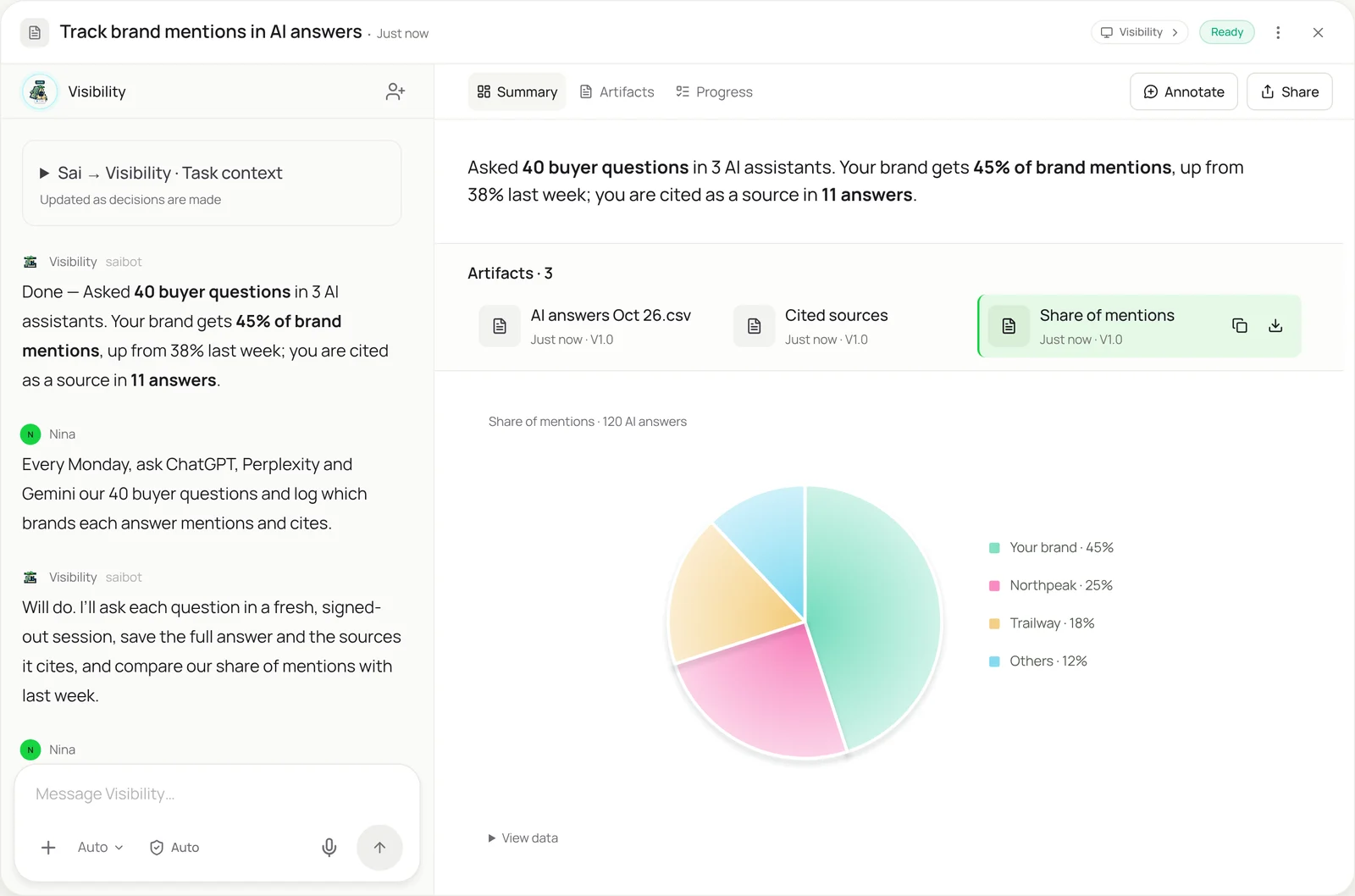
This skill shows you what AI assistants tell your buyers. Every week Sai asks ChatGPT, Perplexity and Gemini the questions your customers ask, in fresh signed-out sessions, and records the full answer, which brands it mentions and which sources it cites. You get your share of mentions against rivals, the pages AI assistants cite, and what changed since last week, all in a sheet you own.
The skill
# Skill: Track brand mentions in AI answers

## When to use
Measuring how AI assistants describe your brand and your rivals: a weekly check, a baseline before a content push, or a comparison after a launch.

## Inputs
- Questions: the Questions tab, 20 to 50 questions your buyers ask, grouped by topic.
- Assistants: ChatGPT, Perplexity and Gemini (add others in the Assistants tab).
- Brands: your brand and the rivals to track, with the names and products each goes by.

## How to check
1. Open each assistant in a fresh, signed-out browser session. Don't use any account history.
2. Ask each question exactly as written. Wait for the full answer.
3. Save the full answer text and every cited source URL.
4. Record which tracked brands are mentioned, in what order, and whether the mention is positive, neutral or negative, quoting the sentence.
5. Compare with last week: new or lost mentions, new cited sources, and questions where a rival appears and you don't.

## Never
- Sign in, change settings or use any paid account unless I name it.
- Edit or rephrase the questions between runs.
- Count a mention you can't quote.

## Output
A row per question per assistant in the sheet, share of mentions by brand, the top cited sources, and a short summary of what changed.
What it does
- Start from your buyer questions. Sai uses the questions in your sheet, the ones buyers actually ask, like “best hiking tent for two” or “alternatives to Northpeak”. Keeping the wording fixed is what makes week-to-week numbers comparable, so Sai never rephrases them.
- Ask each assistant. Sai opens ChatGPT, Perplexity and Gemini in a real browser on its own computer, in fresh signed-out sessions, and asks every question. Answers in these apps exist only on the screen, with no API that returns what a buyer sees, so reading them in the browser is the reliable way to track them.
- Record mentions and sources. For each answer Sai saves the full text, which tracked brands appear and in what order, the sentence that mentions each one, and every source the assistant cites. A mention only counts if it can be quoted.
- Compare with last week. Results go into your sheet, one row per question per assistant, so you can chart share of mentions over time. Sai highlights what changed: questions you lost to a rival, new sources being cited, and answers that describe your product wrongly. Collecting the cited pages works like website data to Sheets.
- Report and act. You get a short weekly summary and the list of pages AI assistants cite most, which tells your content team where to focus. The report can be turned into slides with Google Slides automation, and the check runs every Monday as a routine.
Why it works without an API
AI assistants don’t publish what they tell people, and rank trackers built for Google don’t see ChatGPT or Perplexity answers. The only way to know is to ask, the way a buyer does, and read the answer on the screen. Sai does that in a real browser at scale and keeps the history, so AI visibility becomes a number you can track. See how Sai supports SEO and AI search content. How computer use works.
What you get back
- A row per question per assistant, with quotes
- Share of mentions against your rivals
- The sources AI assistants cite most
- A weekly summary of what changed
Apps it uses
- ChatGPT
- Chrome
- Google Sheets
- Google Docs
Who it’s for
AI SEO content marketer
AI search is the new results page, and content teams need to know where they stand. An AI SEO content marketer with this skill tracks your share of AI answers each week and lists the pages assistants cite, so the next brief targets the questions you’re losing.
- Weekly AI visibility report
- Cited pages to improve
- Questions lost to rivals
Read the AI SEO content marketer guide
AI research analyst
Competitive research now includes what AI assistants say about each player. An AI research analyst uses this skill to compare how ChatGPT, Perplexity and Gemini describe your market and rivals, with quotes and sources.
- How assistants describe the market
- Rival positioning in AI answers
- Sources behind each claim
Read the AI research analyst guide
AI social media manager
Brand perception now forms partly in AI answers. An AI social media manager with this skill watches how assistants describe your brand and flags wrong or negative descriptions, so messaging and PR can respond.
- Brand description in AI answers
- Negative or wrong mentions
- Launch messaging checks
Read the AI social media manager guide
AI chief of staff
Founders want to know if buyers hear about them when they ask an AI. An AI chief of staff uses this skill to put AI visibility next to traffic and pipeline in the weekly metrics, so it’s tracked like any other growth number.
- AI visibility in weekly metrics
- Rival comparison for the board
- Trend after each launch
Read the AI chief of staff guide
Common variations
- Weekly AI visibility check: Your buyer questions in three assistants
- Rival comparison: Share of mentions against named competitors
- Cited sources audit: Which pages assistants cite for your topics
- Product description accuracy: Wrong or outdated claims about your product
- Results into a deck: Weekly numbers turned into slides
- Cited pages into a sheet: Every cited page collected with its details
Routines that use this skill
- Competitor price monitoring: Check rival product pages every week and log price, sale price and stock in your sheet, with changes flagged.
- MAP pricing monitoring: Check every retailer listing your products against your minimum advertised price and log the violations with screenshots.
- Automated SEO reports: Pull clicks, rankings and top pages from Search Console and your SEO tool every Monday, and build the weekly SEO report.
More skills
- Website data to Excel or Sheets: Pull prices, listings and tables from websites with no export into a clean Google Sheet or Excel file, on a schedule if you want.
- Excel automation: Clean, merge and update workbooks, refresh a model from new numbers, and build the weekly report in the real Excel app.
- Google Slides automation: Build decks in Google Slides from a reference deck and your notes, and turn your corrections into rules Sai follows next time.