
PowerPoint automation: let Sai update your recurring decks
This skill hands Sai the deck you rebuild every month or quarter: the board deck, the business review, the client report. Sai opens last period’s version in the real PowerPoint app, pulls the new numbers from your sheets, updates every figure, table and chart, and writes speaker notes that say where each number came from. Your template, fonts and layouts stay as they are, and anything that needs a judgment call, like a headline, is left for you.
The skill
# Skill: Update a recurring deck

## When to use
Any task that refreshes a deck you rebuild on a schedule: the monthly or quarterly board deck, a business review, a client report, a sales kickoff deck.

## Inputs
- Last period's deck (name and folder), and the template it uses.
- Where the numbers live: the sheets, tabs and cells for each slide, listed in the Deck map tab.

## How to update
1. Save a copy named <Deck>_<period>_v1 next to last period's file. Never edit last period's deck.
2. Go slide by slide using the Deck map. Replace every number, date and label that has a new value.
3. Rebuild charts from the source data. Keep chart type, colors and axis format the same.
4. Refresh tables. Remove rows that no longer apply and add new ones in the same style.
5. Write two to four lines of speaker notes per slide with the source of every number.
6. If a number is missing, a source doesn't match last period's definition, or a slide needs a new headline, leave it for me with a note on the slide.

## Never
- Change the template, layouts, fonts or colors.
- Write new claims or headlines without my choice.
- Email, share or present the deck.

## Output
The updated deck saved next to last period's, a list of what changed on each slide, and the slides that need me.
What it does
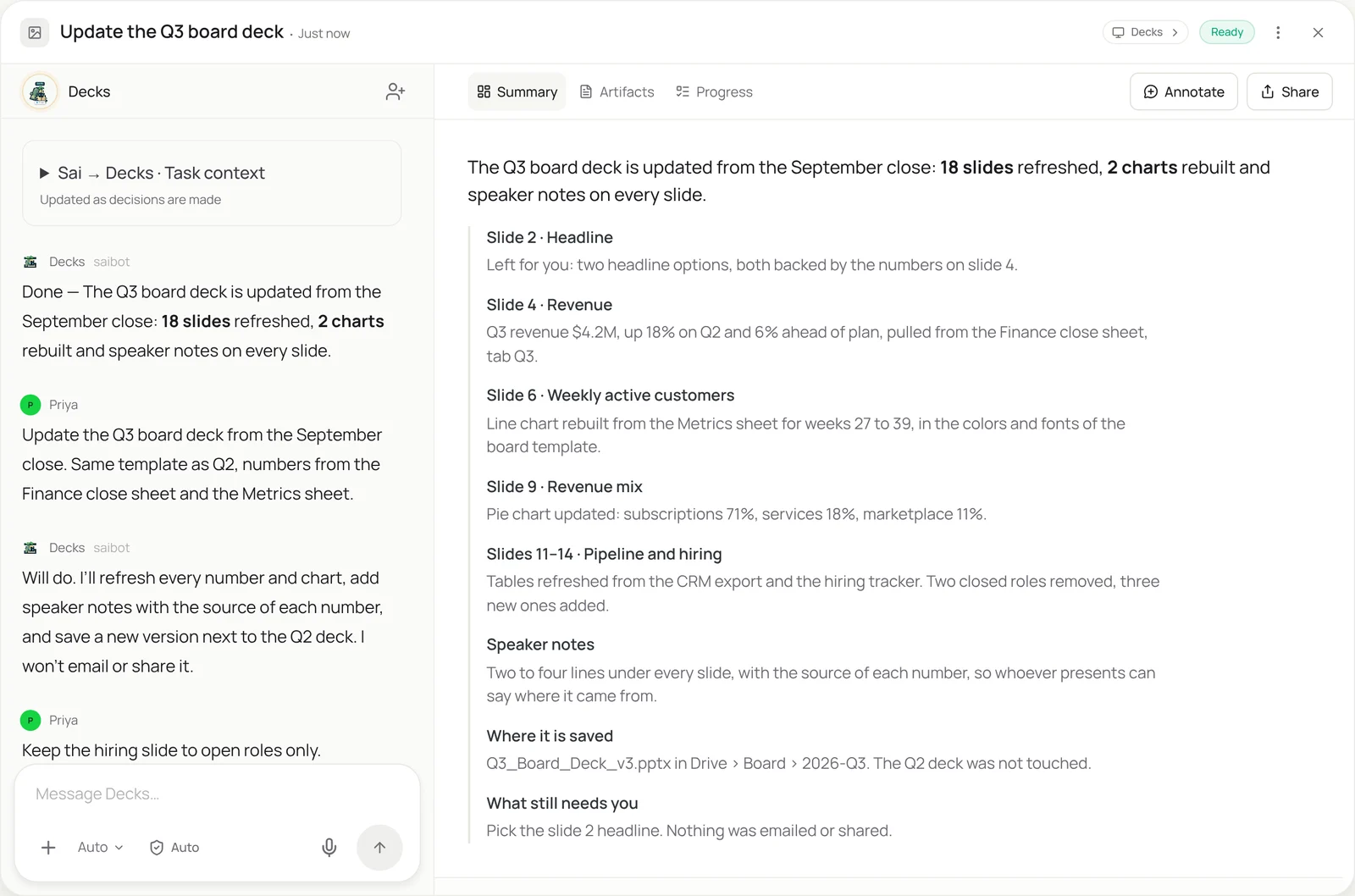
- Open last period’s deck. Sai starts from the deck you already trust. It opens last quarter’s file in the real PowerPoint app on its own computer and saves a new dated copy beside it, so the old version is never touched. It reads your Deck map, the short list of which sheet and cell feeds which slide, so it knows where every number should come from.
- Pull the new numbers. Next it opens the sources: the finance close workbook, the metrics sheet, the CRM export, the hiring tracker. It reads the values for the new period and checks they use the same definitions as last time, for example that revenue is still recognized revenue and not bookings. A number that looks off against last period is flagged rather than pasted in.
- Update every slide. Sai goes slide by slide: numbers in text boxes, dates in footers, rows in tables, labels on charts. It edits inside your template the way a person would, so placeholders, master layouts and fonts stay exactly as designed. Rows that no longer apply are removed, new ones added in the same style.
- Rebuild the charts. Charts are rebuilt from the source data, not retyped. Sai keeps the chart type, colors and axis format from last period, updates the data range, and checks that the chart matches the table next to it. Charts copied from Excel are refreshed from the workbook so the slide and the sheet agree. Decks kept in Google Drive use Google Slides automation instead.
- Write notes and hand back. Finally Sai adds speaker notes to every slide, with the source of each number, so whoever presents can answer “where did that come from?”. It lists what changed on each slide, leaves any headline or judgment call for you with the options it sees, and saves the deck. Nothing is emailed, shared or presented.
Why it works without an API
Most decks have no useful API: the numbers sit in text boxes, tables and charts inside a template, and add-ins only cover pieces of the job. Sai updates the deck through the screen in the real PowerPoint app, the way an analyst does, so it can open the finance workbook, copy the right numbers, rebuild charts and keep the template intact, without a plugin or a script. How computer use works.
What you get back
- The updated deck, saved next to last period’s
- A list of what changed on every slide
- Speaker notes with the source of each number
- The slides and choices left for you
Apps it uses
- PowerPoint
- Excel
- Google Drive
- Google Sheets
Who it’s for
AI chief of staff
The board deck is rebuilt every quarter from the same sources: the close, the KPI sheet, the hiring plan. An AI chief of staff with this skill refreshes every slide from those sources the week the books close, adds notes on where each number came from, and leaves the narrative slides for the founder to write.
- Quarterly board deck
- Monthly investor update slides
- All-hands metrics deck
Read the AI chief of staff guide
AI investment analyst
Investment teams update the same decks constantly: portfolio reviews, quarterly LP reports, IC decks that follow a fixed format. An AI investment analyst uses this skill to drop each company’s latest numbers into the portfolio review and rebuild the charts, so partners review the numbers instead of formatting them.
- Portfolio review deck
- Quarterly LP report
- IC deck in the firm’s format
Read the AI investment analyst guide
AI sales assistant
Account teams present quarterly business reviews built on the same template for every customer. An AI sales assistant with this skill pulls usage and support data for each account, updates the QBR deck, and drafts the speaker notes, so reps walk into the meeting with a current deck.
- Customer QBR decks
- Renewal and expansion decks
- Pipeline review slides
Read the AI sales assistant guide
AI research analyst
Research teams publish recurring decks: the monthly market update, the competitor review, the pricing tracker. An AI research analyst uses this skill to refresh the charts and tables from the tracking workbook and note the source of every figure on the slide.
- Monthly market update
- Competitor review deck
- Pricing and share charts
Read the AI research analyst guide
Common variations
- The quarterly board deck: Close workbook and KPI sheet into the board template
- Excel charts into PowerPoint: Refreshed workbook charts pasted into the deck
- Customer QBR decks: One deck per account from usage and support data
- A deck from a report: A long report turned into slides in your template
- The same deck in Google Slides: Recurring decks kept in Google Drive
- Bulk-update a template: New logo, dates or disclaimer across many decks
Routines that use this skill
- Automated client reporting: Collect each client’s numbers from ads, analytics and social dashboards and fill their monthly report template.
More skills
- Google Slides automation: Build decks in Google Slides from a reference deck and your notes, and turn your corrections into rules Sai follows next time.
- Excel automation: Clean, merge and update workbooks, refresh a model from new numbers, and build the weekly report in the real Excel app.
- Website data to Excel or Sheets: Pull prices, listings and tables from websites with no export into a clean Google Sheet or Excel file, on a schedule if you want.