
Insurance eligibility verification: let Sai check coverage before every visit
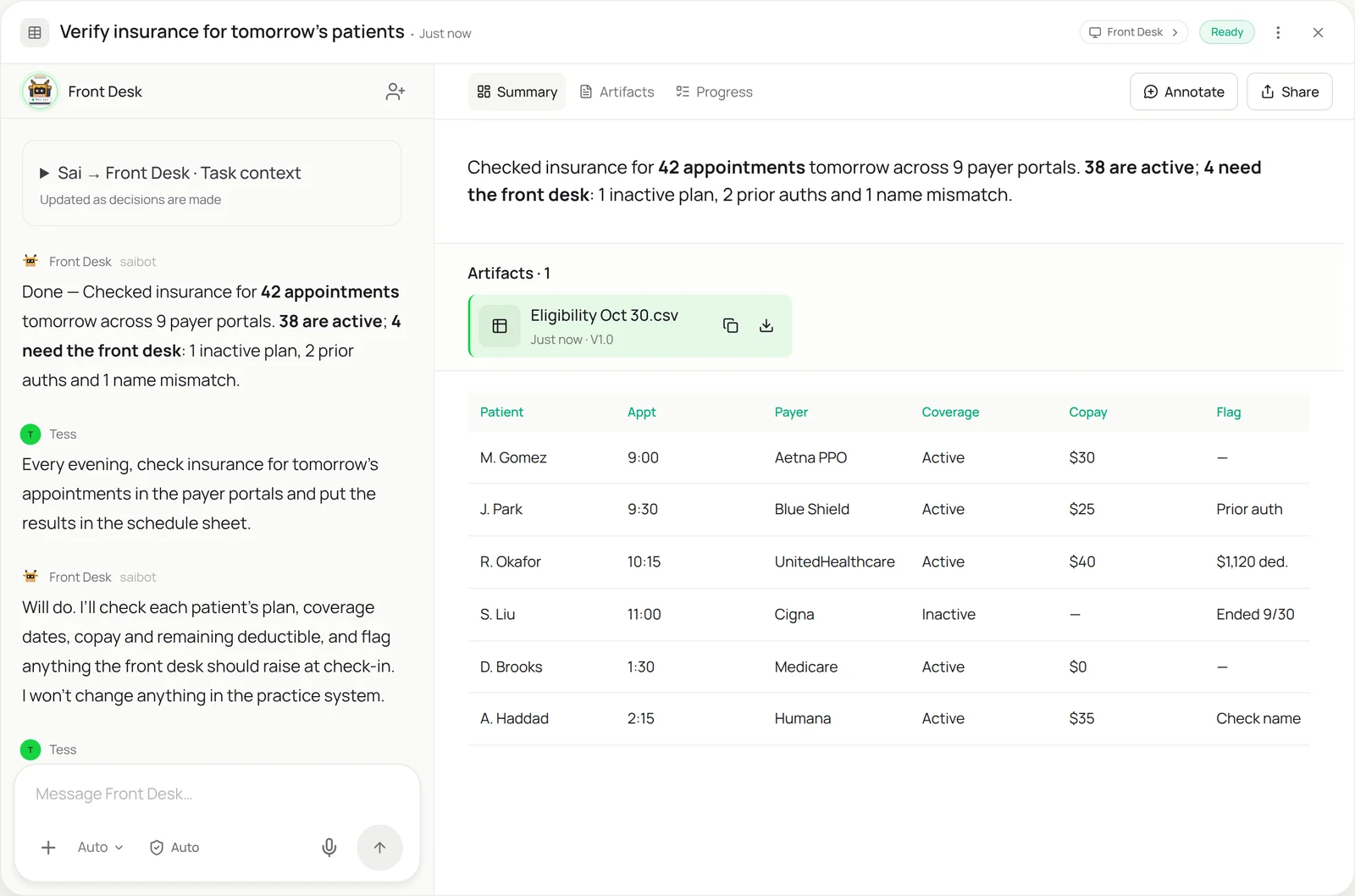
This skill takes the night-before insurance checks off your front desk. Every evening Sai opens tomorrow’s schedule, signs in to each payer portal, and checks every patient’s plan, coverage dates, copay and remaining deductible. Results go into your schedule sheet, and anything the front desk should raise at check-in, like an inactive plan, a prior authorization or a name that doesn’t match, is flagged. Sai only reads; it never changes anything in the practice system.
The skill
# Skill: Insurance eligibility verification

## When to use
Checking insurance before visits: the evening before each clinic day, for new patients when they book, or before procedures that may need prior authorization.

## Inputs
- The schedule: tomorrow's appointments from the practice system export or schedule sheet (patient, date of birth, member ID, payer, visit type).
- Payer portals: the list in the Payers sheet, with the practice's own sign-in for each.
- Rules: which visit types need prior authorization for which payers.

## How to check
1. For each appointment, open the payer's portal and search by member ID and date of birth.
2. Record plan name, coverage status and dates, copay for the visit type, deductible remaining and out-of-pocket remaining.
3. Flag: inactive or ended plans, prior authorization needed for the visit type, names or dates of birth that don't match, and secondary coverage.
4. If a portal is down or the member isn't found, mark it "Not verified" with the reason. Never guess.
5. Write results to the schedule sheet, one row per appointment, with the date and time checked.

## Never
- Change anything in the practice system or a payer portal.
- Submit claims, prior authorizations or appeals.
- Copy patient information anywhere except the schedule sheet.

## Output
The schedule sheet updated with coverage for every appointment, and a short list for the front desk.
What it does
- Read tomorrow’s schedule. Sai starts each evening from the schedule export or sheet: patient, date of birth, member ID, payer and visit type. It works only from what your practice already has, and checks the list against yesterday’s run so a patient booked twice isn’t checked twice.
- Sign in to each payer portal. Payer portals have no shared API for small practices, so staff sign in to each one by hand. Sai does the same on its own computer, using the practice’s own sign-in for each payer, and works through the patients for that payer before moving to the next.
- Check coverage. For every patient Sai records the plan, coverage dates, copay for the visit type, and the deductible and out-of-pocket still remaining. If the portal can’t find the member or is down, the row says “Not verified” and why, instead of a guess.
- Flag what the front desk needs. Using your rules, Sai flags inactive plans, visits that need prior authorization, secondary coverage and names or birth dates that don’t match the portal. A mismatch comes to you as a question rather than being corrected, because the front desk should confirm it with the patient.
- Write it to the schedule. Results land in the schedule sheet, one row per appointment with the time checked, ready for the morning huddle. It runs every evening as a routine. Copying results into another system works like automated data entry.
Why it works without an API
Payer portals are built for people: every insurer has its own site, sign-in and layout, and clearinghouse tools don’t cover every payer or every detail a front desk needs. Sai reads each portal the way your staff do, through the screen, so it works across payers without an integration. Before using Sai with patient information, confirm with your compliance team that your setup meets your HIPAA requirements. How computer use works.
What you get back
- Coverage, copay and deductible for every appointment
- Flags for prior auth, inactive plans and mismatches
- “Not verified” rows with the reason
- A short list for the front desk
Apps it uses
- Payer portals
- Chrome
- Google Sheets
- Practice system
Who it’s for
AI customer support agent
In a practice, the front desk is customer support: patients call about bills, coverage and appointments. An AI customer support agent with this skill knows each patient’s coverage before they call or arrive, so answers about copays and authorizations are right the first time.
- Night-before coverage checks
- Copay answers for patient calls
- Flags for the morning huddle
Read the AI customer support agent guide
AI bookkeeping
Most denied claims start with eligibility that wasn’t checked. An AI bookkeeper for a practice uses this skill so every visit is verified before it happens, which keeps claims clean and the billing team focused on real exceptions.
- Fewer eligibility denials
- Deductible status before the visit
- Secondary coverage noted
AI executive assistant
Practice managers juggle staffing, schedules and payers. An AI executive assistant with this skill takes the evening verification off the manager’s list and sends a short summary of what needs attention tomorrow.
- Evening summary for the manager
- Prior auths to chase
- Schedule changes flagged
Read the AI executive assistant guide
AI employees
Eligibility checks are a classic first job to hand to an AI employee: repetitive, rule-based and done in portals with no API. This guide shows how to set up the role and the approvals around it.
- A first AI employee for a practice
- Clear rules and approvals
- Daily work on a schedule
Common variations
- Night-before checks: Tomorrow’s schedule checked every evening
- New patient checks: Coverage checked when a patient books
- Dental insurance verification: Benefits and frequencies from dental payer portals
- Prior authorization lookups: Whether a visit type needs prior auth
- Results into the practice system: Verified coverage typed into the patient record
- Claim status checks: Status of submitted claims from payer portals
More skills
- Automated data entry: Copy records from forms, PDFs and emails into portals, CRMs and sheets, field by field, with every entry checked and logged.
- Website data to Excel or Sheets: Pull prices, listings and tables from websites with no export into a clean Google Sheet or Excel file, on a schedule if you want.
- Real estate data entry: Turn listing agreements and agent sheets into MLS listing drafts, CRM records and transaction files, with every field checked.