
Real estate data entry: let Sai prepare listings and records
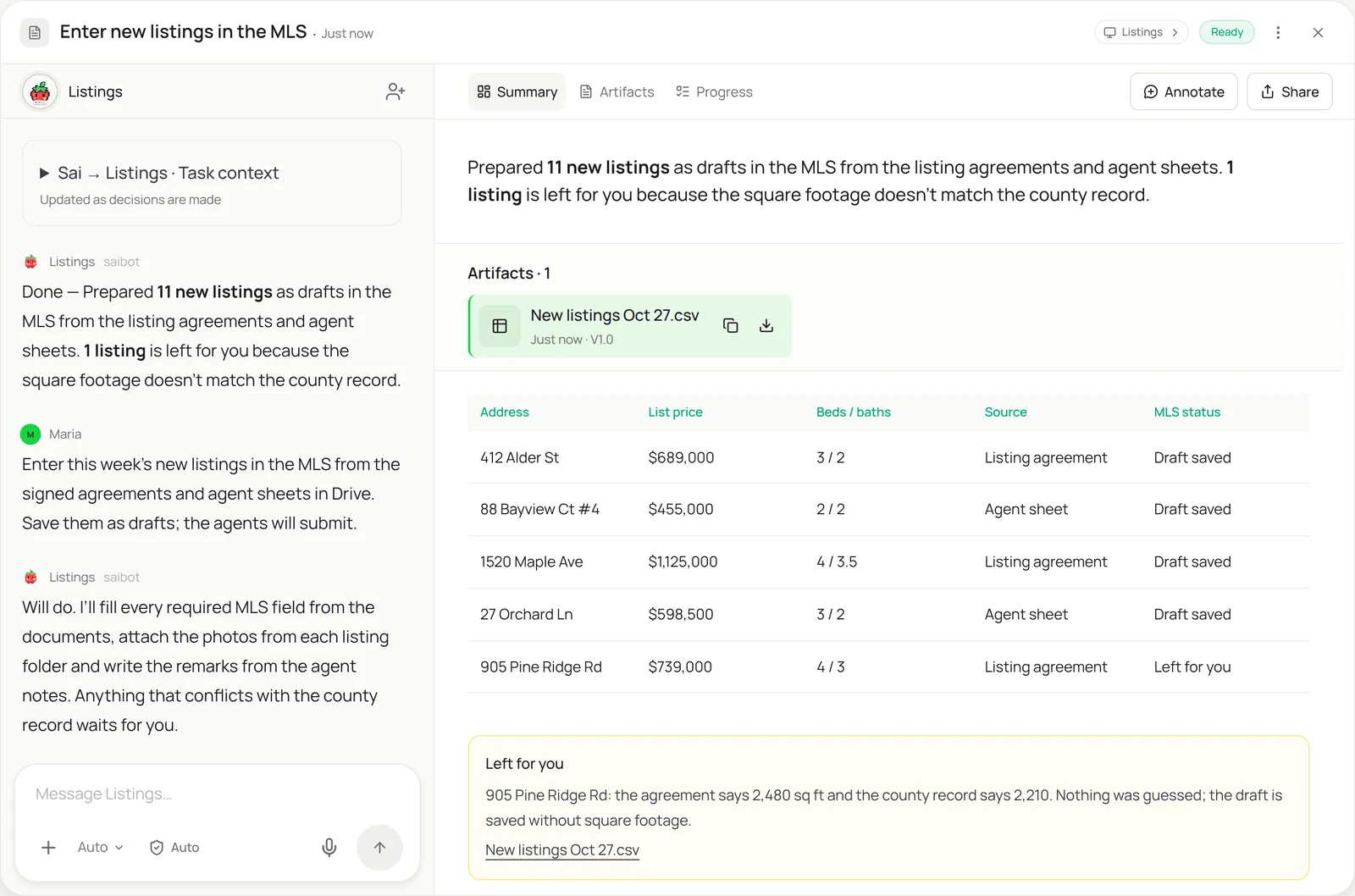
This skill takes over the typing that slows every brokerage down: MLS listing input, CRM records for new clients and transaction files for each deal. Sai reads the signed listing agreement and the agent’s sheet, fills every required MLS field, attaches the photos and writes the remarks from the agent’s notes. Listings are saved as drafts for the agent to review and submit, and anything that doesn’t match the county record is left for you.
The skill
# Skill: Real estate listing and record entry

## When to use
Entering real estate data from documents: new MLS listings, price changes and status updates, CRM records for new clients, and transaction files for each deal.

## Inputs
- Documents: the listing folder in Drive (signed listing agreement, agent sheet, photos, disclosures).
- Systems: the MLS listing input screen, the CRM, and the transaction management tool.
- Brokerage rules: standard showing instructions, remarks style guide, and required fields per property type.

## How to enter
1. For each new listing folder, read the agreement and agent sheet. Use the agreement when the two disagree, and note it.
2. Check address, parcel number, lot size, square footage and year built against the county record. If they differ, leave the field empty and tell me.
3. Fill every required MLS field for the property type, using the brokerage's showing instructions.
4. Write public remarks from the agent's notes, describing only the property and location.
5. Upload photos in the order of the agent's shot list. Save the listing as incomplete; never submit.
6. Create or update the client in the CRM and open the transaction file with the agreement attached.

## Never
- Submit, activate or change the status of a listing.
- Write remarks about who should live there or describe neighbors (fair housing).
- Change list price, commission or dates without the signed document.

## Output
MLS drafts ready for agent review, CRM and transaction records, and a list of mismatches for me.
What it does
- Read the listing folder. Sai opens each new listing folder in Drive and reads the signed listing agreement, the agent’s sheet, the disclosures and the photo shot list. When the agent’s sheet and the agreement disagree, it uses the signed agreement and notes the difference, the way a careful listing coordinator would.
- Check against public records. Before entering anything, Sai looks up the property in the county records and compares address, parcel number, lot size, square footage and year built. A mismatch, like 2,480 square feet on the agreement and 2,210 on record, is left empty and flagged, because a wrong number in the MLS is a compliance problem, not a typo.
- Fill the MLS listing. Sai opens your MLS listing input screen, which rarely has an import, and fills every required field for the property type: rooms, features, schools, showing instructions, taxes. Remarks are written from the agent’s notes in your brokerage’s style, describing only the property and location. Typing into any web form works like the automated data entry skill.
- Attach photos and save. Photos are uploaded in the order of the agent’s shot list, with captions if your MLS supports them. The listing is saved as incomplete, so the agent reviews and submits it under their own name, as MLS rules expect. Sai never submits or activates a listing.
- Update the CRM and transaction file. Finally Sai creates or updates the seller in your CRM and opens the transaction file with the agreement attached, so marketing and closing start from the same data. You get a list of what was prepared and the mismatches that need you. Comparable sales and market data can be gathered with website data to Sheets.
Why it works without an API
MLS systems, real estate CRMs and transaction tools rarely share data, and most MLS listing input has no import at all, which is why brokerages pay for data entry services. Sai reads the paperwork and types into each system through the screen, like a listing coordinator, so one skill covers the MLS, the CRM and the transaction file. Sai ranks at the top of OSWorld, the open benchmark for computer use. How computer use works.
What you get back
- MLS listings saved as drafts for agent review
- CRM records for new clients
- Transaction files with documents attached
- A list of mismatches against public records
Apps it uses
- MLS
- Google Drive
- Chrome
- Google Sheets
Who it’s for
AI executive assistant
Busy agents and team leads rely on an assistant for paperwork. An AI executive assistant with this skill prepares each new listing, updates the CRM and opens the transaction file, so the agent reviews and submits instead of typing between showings.
- Listing input for a top agent
- Client records after each signing
- Transaction files opened
Read the AI executive assistant guide
AI RevOps manager
Brokerages run on CRM data: leads, clients, listings and closings. An AI RevOps manager uses this skill to keep the CRM matched to the MLS and the transaction tool, so pipeline and commission reports are right.
- CRM matched to the MLS
- Listing and closing status updates
- Clean reporting data
Read the AI RevOps manager guide
AI project manager
Every transaction is a small project with deadlines and documents. An AI project manager with this skill opens the transaction file from the agreement, enters the key dates and tracks which documents are still missing.
- Transaction files from the agreement
- Key dates entered
- Missing documents tracked
Read the AI project manager guide
AI research analyst
Pricing a listing means gathering comparable sales and market data from many sites. An AI research analyst uses this skill alongside web collection to put comps into one sheet with sources, so agents price from the same numbers.
- Comparable sales sheets
- Market stats by neighborhood
- Sources on every number
Read the AI research analyst guide
Common variations
- New MLS listings: Agreements and agent sheets into drafts
- Price and status changes: Signed amendments into MLS updates
- Leads into a real estate CRM: Portal leads and sign-in sheets as contacts
- Transaction files: Deals opened with documents and dates
- Comparable sales to a sheet: Comps collected from public sites
- Property management records: Leases and tenants into the PM software
More skills
- Automated data entry: Copy records from forms, PDFs and emails into portals, CRMs and sheets, field by field, with every entry checked and logged.
- Website data to Excel or Sheets: Pull prices, listings and tables from websites with no export into a clean Google Sheet or Excel file, on a schedule if you want.
- Insurance eligibility verification: Check coverage, copays and deductibles for tomorrow’s patients in each payer portal and log the results in your schedule sheet.