
AI PDF form filler: fill out forms from your documents automatically
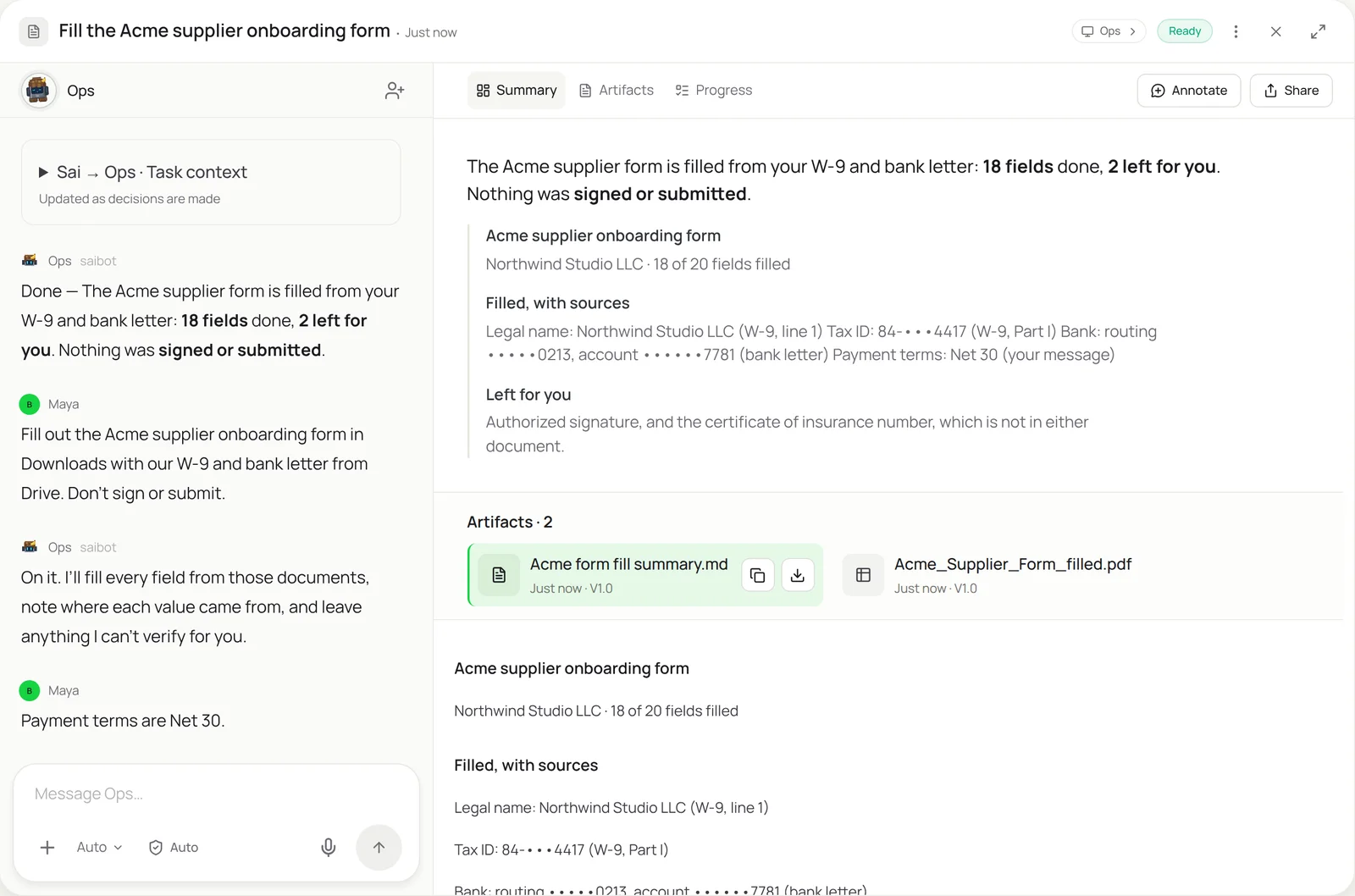
This skill lets Sai fill out a form the way an assistant would: it opens the PDF or portal on its own computer, finds each answer in your W-9, bank letter or past forms, types it in, checks every page, and stops before anything is signed, submitted or paid. A supplier onboarding form that takes 30 minutes by hand comes back in about 3, with a source next to every field.
The skill
# Skill: Fill out forms from my documents

## When to use
Any request to fill out a PDF or web form (supplier onboarding, vendor and tax forms, school or event registration, insurance or permit applications) with information that already exists in my files.

## Inputs
- The blank form: a PDF in Drive, an email attachment, or a web portal URL.
- Source documents: W-9, bank letter, ID, last year's version of the form, and the Company Profile sheet.

## How to fill
1. Open the form and list every field, including checkboxes and fields on later pages.
2. Find each value in the source documents. Copy it exactly and keep its format (dashes in tax IDs, leading zeros).
3. Record the source of every value: document name and page.
4. If a value is missing or two sources disagree, leave the field empty and ask me. Never guess.
5. When done, take a screenshot of every page and check each field against its source.

## Never
- Sign, submit, send or pay anything without my OK.
- Type full bank, tax or ID numbers into a site I have not approved.
- Upload any document other than the ones I named.

## Output
Save a filled copy next to the original as <form name>_filled.pdf, attach the page screenshots, and list: fields filled (with sources), fields left for me, and anything that looked wrong.
What it does
- Open the form. Sai works on its own cloud computer, so your screen stays free. It opens the blank form wherever it lives: a PDF attachment in Gmail, a file in Drive, or a page in a supplier or government portal you have signed it into through an approval link. Before typing anything, it scrolls through every page and builds a list of fields, including checkboxes, dropdowns and the ones hidden on page 3.
- Read your documents. Next it opens each source you named and reads it the way you would: the W-9 for legal name, tax classification and EIN, the bank letter for routing and account numbers, the Company Profile sheet for addresses and contacts, and last year’s form for anything that rarely changes. When two documents disagree, it keeps both values and asks you instead of picking one.
- Fill field by field. Sai clicks into each field and types the value exactly as it appears in the source, keeping formats like the dash in a tax ID or the leading zero in a routing number. It ticks the right boxes, picks dropdown options and moves through page breaks. For every value it records where it came from, by document and page, so you can check any field in seconds.
- Check every page. When the form is full, Sai goes back to page one and checks its own work. It screenshots each page and compares every field with its source. A field it cannot verify, such as a number that is in none of your documents, stays empty and goes on a short list for you.
- Hand it back for your OK. Sai saves a filled copy next to the original and writes a short summary: what it filled, where each value came from, and what is left for you. Then it stops. Signing, submitting the portal application, emailing the form or paying a filing fee happens only after you approve it in Sai.
Why it works without an API
Most form tools need fillable fields, a template set up in advance, or an integration with the portal. Sai needs none of these. It sees the screen and uses the mouse and keyboard, so the same skill works on a fillable PDF, a scanned PDF opened in your PDF editor, and a web form in a portal with no API. When the form changes next year, the skill still works, because Sai reads the new layout instead of replaying recorded clicks. How computer use works.
What you get back
- A filled copy of the form, saved next to the original
- A fill summary with the source of every value
- Screenshots of every page, for your records
- A short list of fields left for you, and why
Apps it uses
- Google Drive
- Gmail
- Chrome
- PDF editor
- Google Sheets
Who it’s for
AI bookkeeping
Finance teams fill the same supplier and vendor forms again and again: onboarding packets from new customers, W-9 requests, ACH authorization forms and credit applications. An AI bookkeeper with this skill fills them from your W-9, bank letter and company profile, keeps a record of what was sent to whom, and leaves the signature to your controller.
- Customer supplier onboarding forms
- ACH and remittance forms
- Credit applications
AI executive assistant
Executives sign up for things constantly, and each sign-up is a form: school and camp registrations, conference and travel forms, visa and expense paperwork. An AI executive assistant uses this skill with the executive’s profile and past forms, prepares each one in minutes, and puts it in front of them only when it needs a signature.
- School and camp registrations
- Conference and event forms
- Travel and visa paperwork
Read the AI executive assistant guide
AI recruiter
Every hire comes with paperwork your team fills in: new-hire setup forms, payroll details from the offer letter, equipment and access requests. An AI recruiter prepares those from the signed offer and your HR system, checks each one, and sends nothing to a candidate or vendor without your approval.
- New-hire setup forms
- Payroll details from the offer
- Equipment and access requests
AI employees
If forms fill a big part of someone’s week, give the work to an AI employee: a dedicated Sai computer with this skill, your documents and a clear rule to stop before anything is signed or submitted. It can work through a backlog of forms overnight and leave a review queue for the morning.
- Operations and admin backlogs
- Insurance and permit renewals
- Vendor compliance packets
Common variations
- Fill a PDF from your W-9 and bank letter: PDF in Google Drive, opened in your PDF editor
- Fill a web form in a supplier or government portal: Chrome on Sai’s computer, signed in through an approval link
- Fill the same form for many people from a spreadsheet: Google Sheets or Excel as the source, one filled PDF per row
- Fill a flat or scanned PDF with no form fields: Your PDF editor’s fill and sign tool
- Fill a form that arrives by email and reply with it: Gmail attachment in, filled copy drafted as a reply
- Renew a permit or insurance form from last year’s copy: Last year’s filed form as the main source, new figures from your files
More skills
- Automated data entry: Copy records from forms, PDFs and emails into portals, CRMs and sheets, field by field, with every entry checked and logged.
- Real estate data entry: Turn listing agreements and agent sheets into MLS listing drafts, CRM records and transaction files, with every field checked.
- Mac automation with AI: Rename and file downloads, clear the Desktop and export app data on your Mac, described in a sentence instead of built in Automator.