
Twitter (X) automation with AI: research, monitoring and drafts, within the rules
Twitter automation, now X automation, splits into two very different things. Posting, liking, following and replying automatically are tightly restricted by X’s rules and belong to the official API or a scheduler. Research, monitoring and drafting are where an AI agent saves the most time. Sai reads X the way you do: it searches, opens profiles and threads, and turns what it finds into sheets, digests and drafts that you publish yourself. This guide explains what X allows, the workflows worth automating first for investors, sales, marketing and product teams, and how to set them up within X’s rules.
Tools: X, Google Sheets, Google Docs, Slack, Notion
TL;DR: what to automate on X, and what to leave manual
Sai is an AI agent that operates a real computer, so it can work through X the way a sharp analyst would: run searches, read profiles and threads, and write up what matters. It does the reading and the writing. You do the posting. Here is what that covers, by team:
- Investors and VCs. Sources founders who just announced they left to build something, went into stealth or made their first hire. Watches portfolio founders and target companies for launches, hiring and customer complaints. Checks how a founder writes, who engages with them and what peers say about a market before a first call.
- Sales. Finds buying signals: people complaining about a competitor, asking for recommendations or describing the exact problem you solve. Logs each one in a sheet with a link and drafts a helpful reply. Researches a prospect’s posts before outreach so your opener is about them.
- Founders, marketers and creators. Logs every post that mentions your brand or product, writes a weekly competitor digest, and drafts posts and threads in your voice from a blog post, a changelog or your notes, ready for you to publish.
- Product and research. Collects feature requests, bug reports and praise about your product into a feedback sheet, and summarizes what builders are saying about a topic each week.
- Recruiting. Finds engineers, designers and operators who post about the work you are hiring for, and drafts a personal first message for you to send.
- Across your tools. Every result can land in Google Sheets, Google Docs, Notion or Slack in the same task, with a link back to each post.
How Sai works with X
Sai opens x.com in a browser on its own cloud computer, signed in to your account, and reads the same timeline, search results and profiles you would. It uses X’s advanced search operators, follows threads, and opens profiles and links. Then it writes: a row in a sheet, a digest in a doc, a summary in Slack, or a draft post in your Library.
Publishing stays with you. X’s automation rules require automated posting to go through the X API, and they prohibit unsolicited automated replies and DMs and automated likes and follows. So this guide sets Sai up to research and draft, and you post what you approve, by hand or with X’s own scheduling.
To get started, sign in to X once on Sai’s computer through Sai’s approval link, so your password never goes into a chat. If X asks for a code or a security check, Sai pauses and posts it in Sai Needs You.
What X allows you to automate
X publishes automation rules. In short: automate reading and drafting freely, post only through approved tools, and never automate engagement. Read the full X automation rules before you set anything up.
| Activity | Allowed? | How to do it |
|---|---|---|
| Research: searching, reading profiles and threads | Yes, at a human pace | Sai, in a browser on its own computer |
| Monitoring brand mentions and competitors | Yes | Sai routines that log to a sheet or digest |
| Drafting posts and replies | Yes | Sai drafts; you post |
| Scheduling your own posts | Yes, through the API | X’s own scheduler or an approved scheduling app |
| Automated likes, follows, reposts | No | Don’t automate |
| Automated replies or DMs to people who didn’t ask | No | Don’t automate |
| Running several accounts to amplify the same content | No | Don’t automate |
Accounts that post automatically through the API should be labeled as automated in X’s settings. That label is what people see as an “automated” account.
How far Sai can go on X
What Sai does in each part of X, and how we recommend setting it up.
| Area | What Sai can do | Recommended setup |
|---|---|---|
| Search | Run keyword and advanced searches (from:, to:, min_faves:, since:), read results page by page | Automatic, read only |
| Profiles and lists | Read bios, recent posts, pinned threads and the lists you curate | Automatic, read only |
| Threads and replies | Read a whole thread and its top replies, quote the useful parts with links | Automatic, read only |
| Your posts and analytics | Read impressions and engagement for your own posts | Automatic, read only |
| Posts and threads | Draft in your voice from notes, blogs or changelogs | Drafts only, you post |
| Replies and mentions | Find mentions and questions, draft a reply for each | Drafts only, you post |
| Direct messages | Summarize your inbox and draft replies to people who wrote to you | Drafts only, you send |
| Likes, follows, reposts | Not automated. X prohibits automating these | You do it |
Rule of thumb: Sai reads at the pace you would and writes everything as a draft. Anything that appears on X under your name is posted by you.
Recommended X workflows
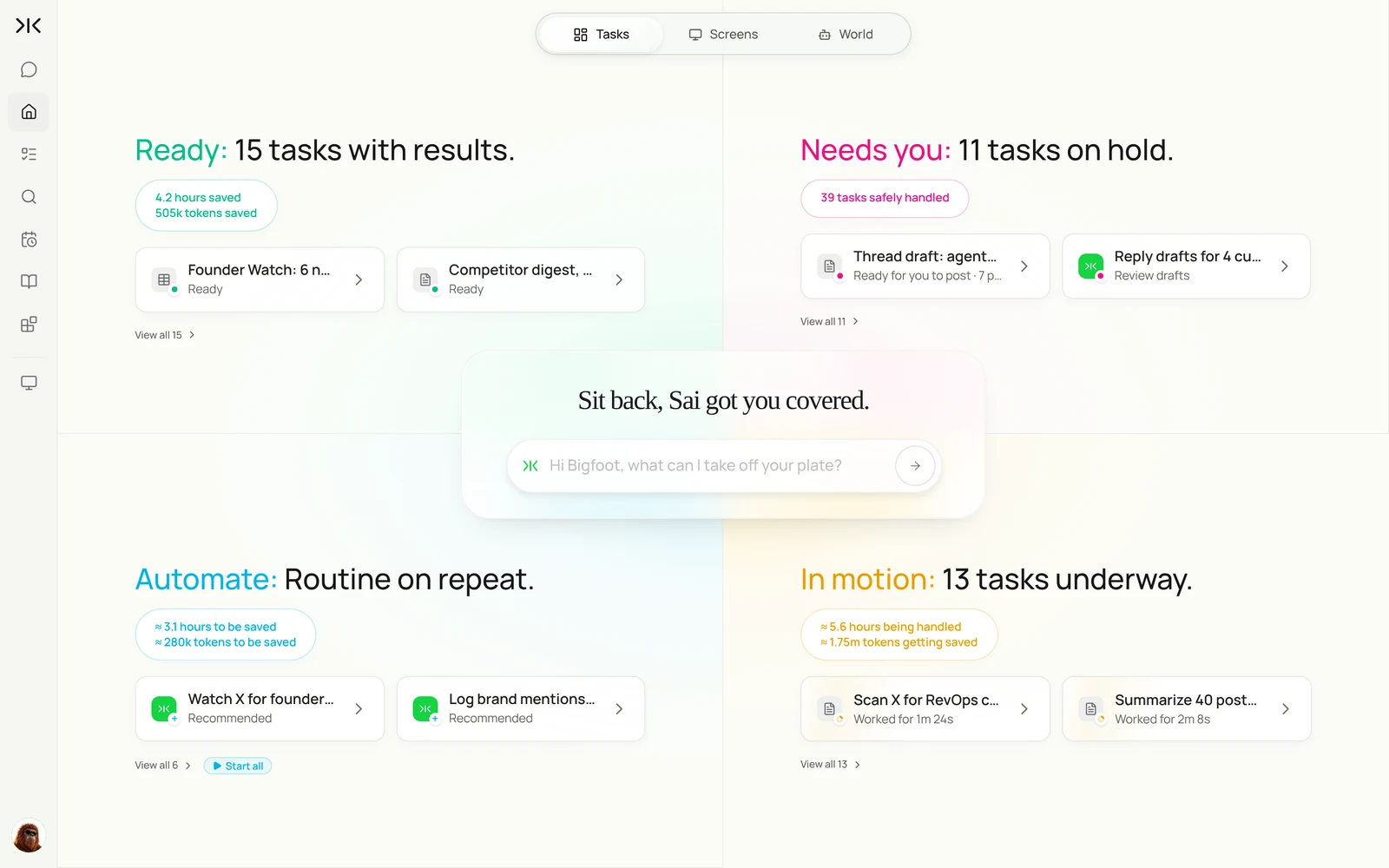
Pick the one that saves you the most reading time each week. Each is set up later in this guide.
| Workflow | Who it is for | What Sai does | Skill | Routine |
|---|---|---|---|---|
| Source founders | VC | Finds people who just started something new and scores them against your thesis | Founder Signals | Daily 7:00 |
| Watch portfolio and targets | VC | Flags launches, hiring and complaints at companies you follow | Founder Signals | Daily 7:30 |
| Catch buying signals | Sales | Logs people who describe your problem or ask for a tool, and drafts a reply | Customer Signals | 9:00 and 15:00 |
| Research a prospect | Sales | Reads a prospect’s recent posts and writes an opener about them | X Research | Before outreach |
| Log brand mentions | Marketing | Adds every post that mentions you to a sheet with a link and sentiment | Mention Log | Daily 7:30 |
| Competitor digest | Marketing | Summarizes competitors’ posts and top replies each week | Competitor Watch | Fridays 16:00 |
| Draft posts and threads | Founders, creators | Turns a blog post or changelog into a thread in your voice | X Voice | On demand |
| Collect product feedback | Product | Gathers feature requests, bugs and praise into a feedback sheet | Customer Signals | Weekly |
| Find candidates | Recruiting | Finds people who post about the work you hire for and drafts a first message | X Research | Weekly |
Set up Sai for X
Setup takes about 15 minutes. After that, every X workflow reuses the same sign-in, skills and rules.
Step 1: Sign in to X on Sai’s computer
Give Sai a first task that needs X, such as Search X for posts about computer-use agents from this week and list the five most discussed. Sai sends an approval link; sign in as you would on a new laptop. The session stays on that computer for later tasks and routines.
Step 2: Write your criteria and voice as skills
Open Abilities → Skills → Add skill → Write skill instructions. Most teams need one criteria skill (Founder Signals for investors, Customer Signals for sales) and one voice skill for drafts. Put the rule that Sai never likes, follows, replies or DMs in every one of them.
When to use it
Any time you search X for people who might need our product.

What counts as a signal
- Complaints about messy CRM data, broken handoffs or manual reporting.
- "Any recommendations for…" posts about RevOps or sales ops tools.
- Mentions of a competitor together with a problem.

Skip
- Vendors, bots, giveaways, accounts under 50 followers.

Output
- One row per signal: author, quote, link, type (pain, question, competitor), fit 1-5.
- A reply draft under 40 words that helps first. No links unless they asked.

Never
- Like, follow, repost, reply or DM. I post replies myself.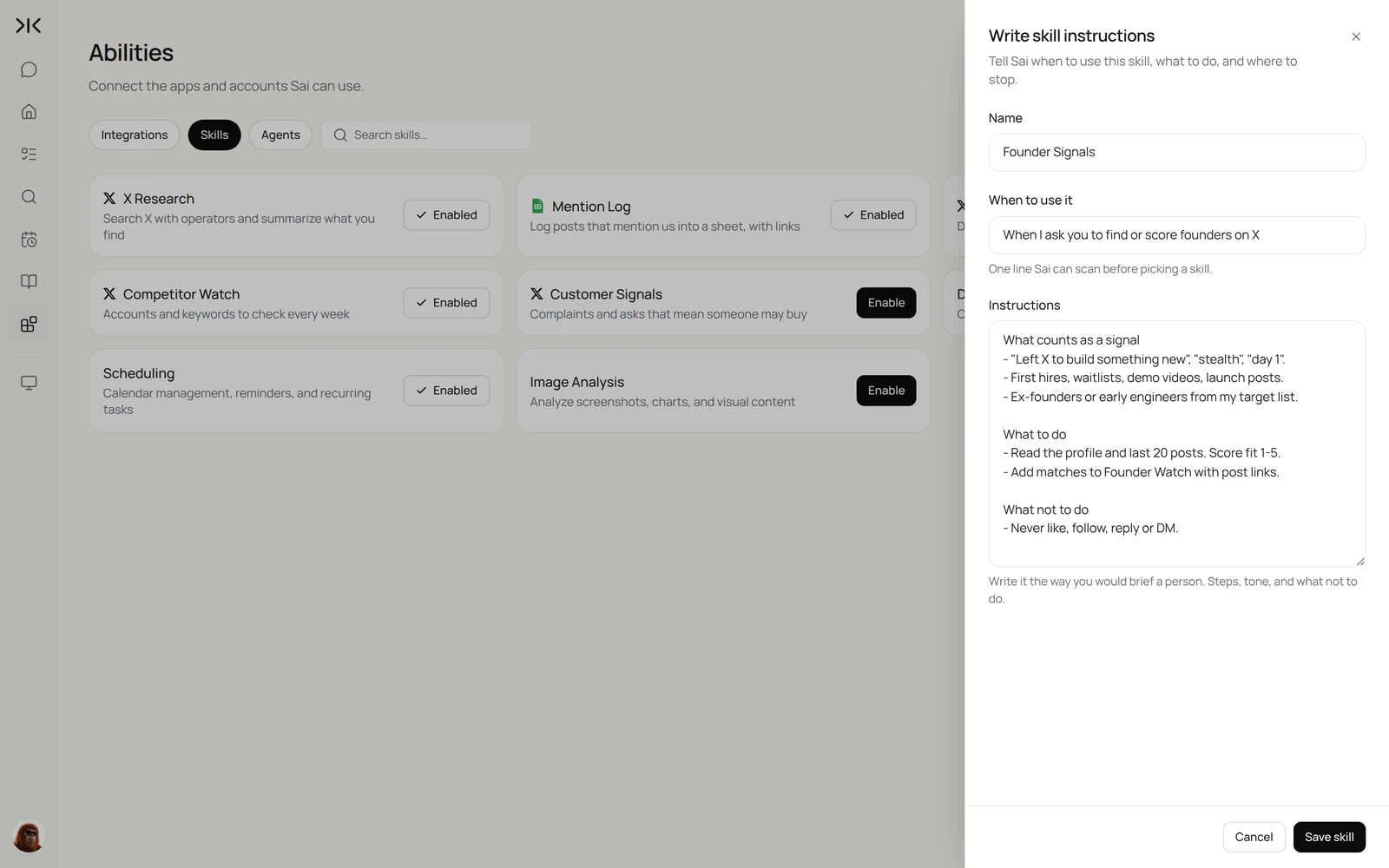
Step 3: Keep posting manual
In the chat, the guardrail next to the input switches between Auto and Manual. Research routines can run on Auto because they only read and write to your own sheets and docs. Drafts go to your Library or a doc, and you post them on X yourself.
Step 4: Turn the task into a routine
Run the task once, check the sheet or digest, then open Routine → New and describe the job in one sentence, including when it should run. Sai offers X starters if you prefer to begin from one. Turn on Code-Replay for searches you run the same way every day. See Routines.
Recipes: investing
For funds and angels who use X as an early-signal feed. Each recipe caps how many profiles it reads per run.
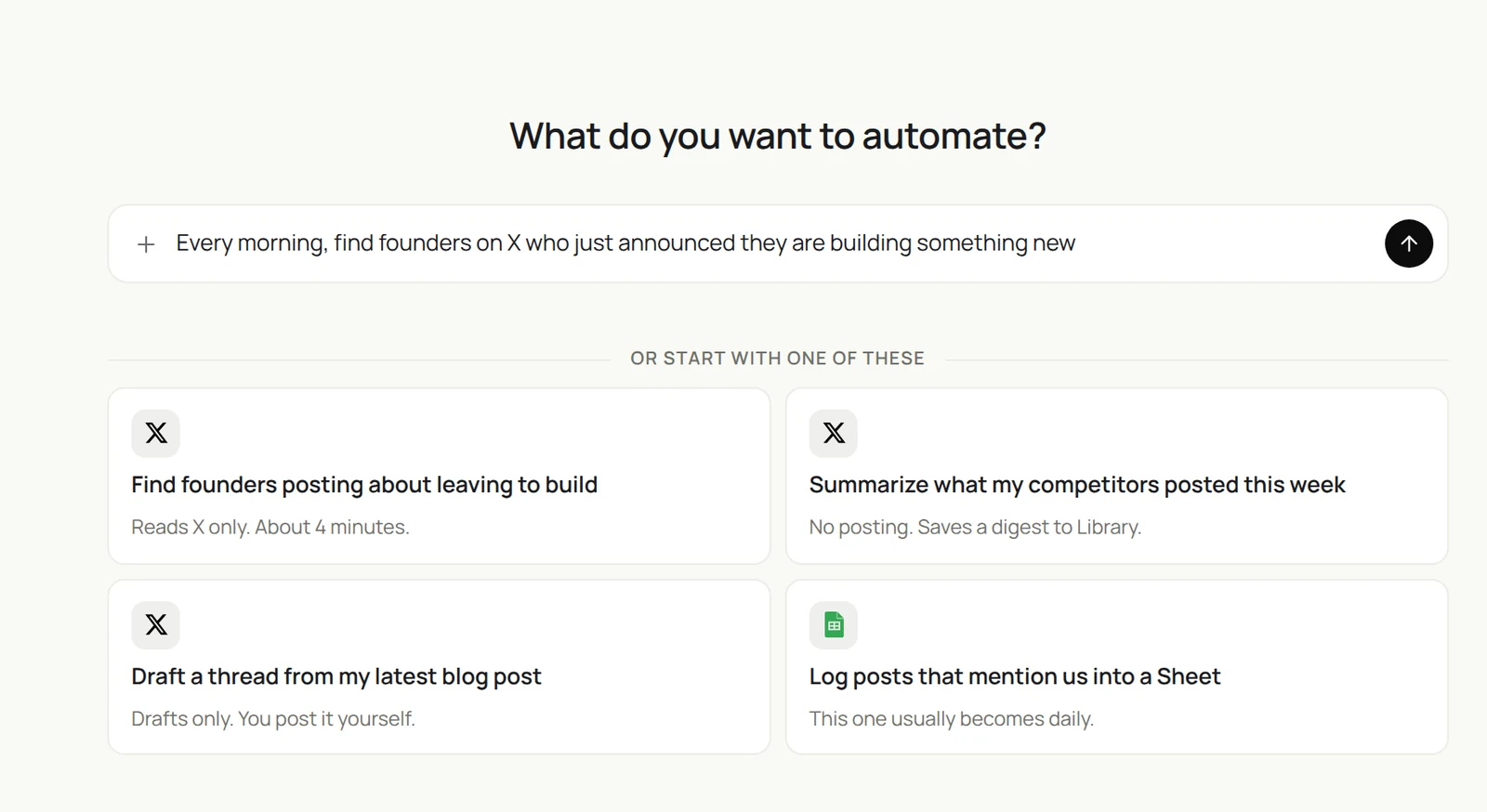
Every morning, search X for people who just said they left to build something new or are in stealth. Check them against my Founder Signals skill and add good fits to Founder Watch. Read only, 30 profiles max.
- 62 matching posts from the last 24 hours
- 30 profiles checked
- 5 strong fits, 9 maybe
- 14 rows added
Source founders who just started something
Many founders announce on X before they show up in any database.
Every morning at 7:00, search X for posts from the last 24 hours that say
"left to build", "something new", "stealth", "day 1" or "we're hiring our first".
Check each author against my Founder Signals skill: background, what they are building, traction signals.
Add fits to the Founder Watch sheet with a link to the post and a fit score.
Read at most 30 profiles. Never like, follow, reply or DM.
Skill: Founder Signals. Setup: Auto, read only.
Watch portfolio and target companies
Get one message a day with only what changed.
Every weekday at 7:30, read the last day of posts from the founders and company accounts
in my Portfolio Watch list on X.
Flag launches, hiring posts, funding news, outages and angry customer replies.
Send me a short Slack summary with links. Skip days with nothing new.
Skill: Founder Signals. Setup: Auto, read only.
Check a market before a first call
What builders actually say about a space, in one page.
Read the 50 most-engaged X posts from the last 90 days about "AI agents for finance teams".
Group them into themes, quote the three best posts per theme with links,
and list the founders and operators who post most thoughtfully about it.
Save a one-page summary to my Library.
Skill: X Research. Setup: Auto, read only.
Recipes: sales
Turn X into a source of warm, specific reasons to reach out.
Twice a day, search X for people complaining about messy CRM data or asking for a RevOps tool. Log real buying signals in the Signals sheet and draft a short, helpful reply for each. Do not post anything.
- 38 posts in the last 12 hours
- 9 real buyers, 29 skipped
- 9 rows with links
- 9 drafts saved to Library
Catch buying signals
People describe their problems in public. Sai finds the ones you can help.
At 9:00 and 15:00, search X for complaints about messy CRM data, manual sales reports
and our three competitors' names together with words like "broken", "switching" or "alternative".
Use my Customer Signals skill. Log real signals in the Signals sheet
and save a reply draft for each to my Library. Do not post anything.
Skill: Customer Signals. Setup: Auto for research, drafts only. Related: automating X posting the right way.
Research a prospect before outreach
Write an opener that is about them, not about you.
For each row in the Outreach sheet with an X handle and an empty Opener column,
read their last 30 posts and replies.
Write one sentence I could open with that refers to something specific they said.
If nothing is relevant, write "no hook".
Skill: X Research. Setup: Auto, read only.
Recipes: marketing and product
Know what is said about you and your competitors, and draft your own posts faster.
Every Friday, read everything my four competitors posted on X this week, plus the top replies. Write a one-page digest: launches, pricing, hiring, and what customers complained about.
- 27 posts this week
- 210 replies scanned
- 1-page digest with 12 links
- Posted with the doc link
Log every mention of your brand
One row per post, so nothing slips.
Every morning at 7:30, search X for posts from the last 24 hours that mention
"Simular", "Sai" with "agent", or our product URL.
Add each to the Mention Log sheet: date, author, followers, quote, link,
and type (praise, question, complaint, bug).
Post a summary in #mentions with anything that needs a reply today.
Skill: Mention Log. Setup: Auto, read only.
Write a weekly competitor digest
One page on Friday instead of scrolling all week.
Every Friday at 16:00, read everything my four competitors posted on X this week,
plus the top replies on each post.
Write a one-page digest in Google Docs: launches, pricing, hiring, and what customers complained about,
with links. Share it in #competitive.
Skill: Competitor Watch. Setup: Auto, read only.
Draft a thread from a blog post
Sai drafts. You edit and post.
Read our latest blog post and draft an X thread of 5 to 7 posts using my X Voice skill.
First post must stand on its own. One idea per post. Link only in the last post.
Give me two options for the first post. Save the drafts to my Library.
Skill: X Voice. Setup: drafts only, you post.
Collect product feedback
Turn public feedback into a list your product team can use.
Every Monday, search X for posts from the last week about our product.
Sort them into feature requests, bugs and praise.
Add each to the Feedback sheet with a quote and a link, and merge duplicates.
List the top three requests by number of mentions.
Skill: Customer Signals. Setup: Auto, read only.
Where the results land
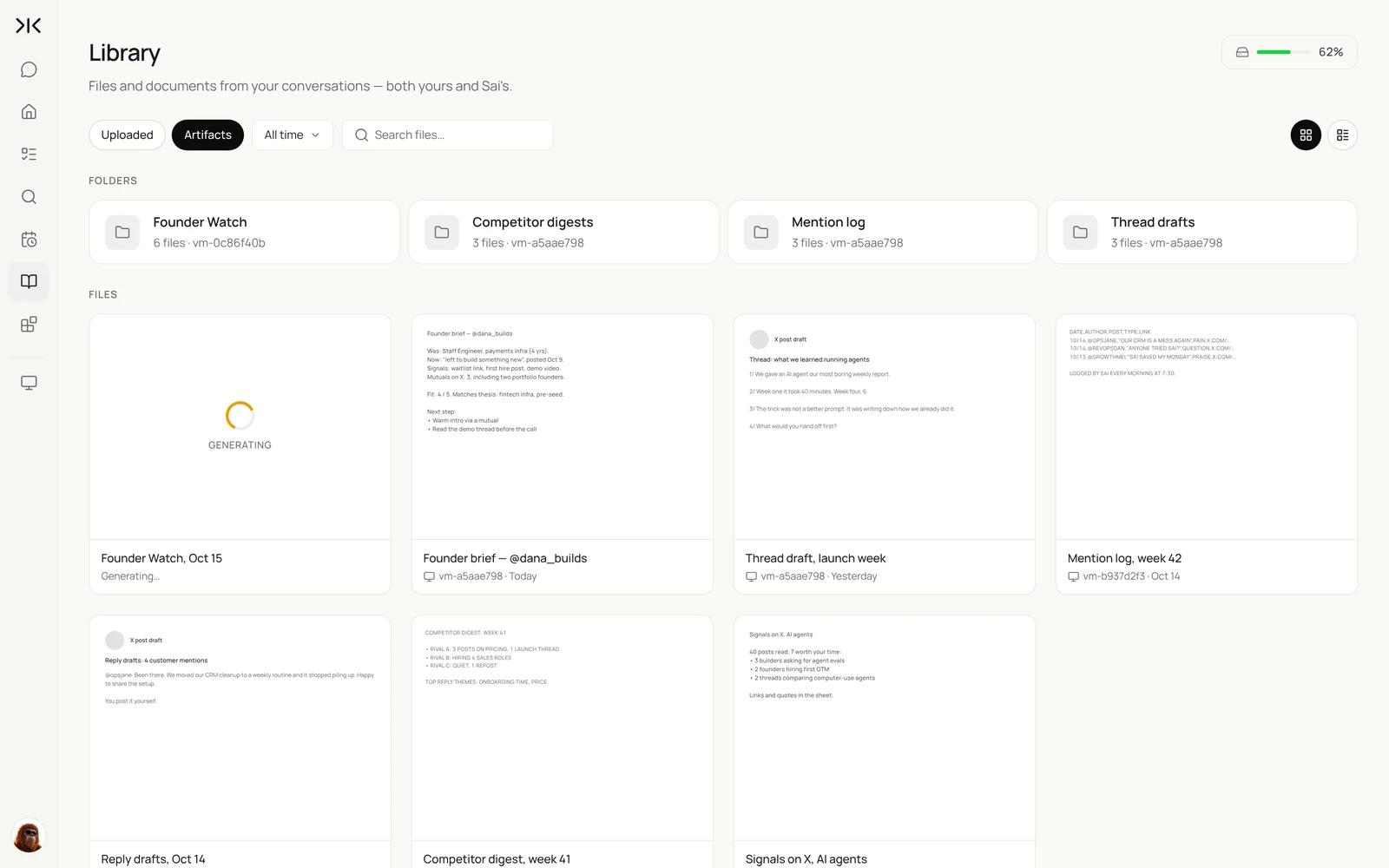
Everything Sai produces from X is saved in your Library: founder briefs, digests, mention logs, reply drafts and thread drafts, grouped by routine. The rows go to the sheets you named in each task.
Twitter automation ideas that stay within the rules
Twelve automations to pick from, grouped by who uses them:
- Founders: a weekly digest of what your market posted, and drafts of a thread from each blog post.
- Investors: founders who just announced something new, scored against your thesis, plus portfolio company mentions.
- Sales: buying signals such as hiring, launches and complaints about a competitor, logged to a sheet with the post link.
- Marketing: every brand mention logged with sentiment, a weekly competitor digest, and reply drafts you post yourself.
- Product: feature requests and bug reports from X grouped into themes every week.
- Research: a market scan before a first call, and a list of the 20 most-cited accounts on a topic.
Templates to start from: X search monitor. Comparing tools? See the best social media management tools.
Stay within X’s rules
- Read at a human pace. Cap profiles and posts per run, and spread routines through the day instead of running them back to back.
- Post yourself. X’s automation rules require the X API for automated posting and prohibit unsolicited automated replies and DMs. Keep Sai on drafts and publish them by hand.
- Never automate likes, follows or reposts. Put that rule in every X skill so it applies to every task.
- Reply only where it helps. Use reply drafts for people who asked a question or described a problem you can solve, and skip anything that would read as spam.
- Use your own account. One person, one account, signed in by you.
Why use Sai for X research
Why Sai is a good fit for X work.
- It reads like an analyst, not a scraper. Sai follows threads, opens profiles and links, and judges whether a post is a real signal, so your sheet has fewer false positives.
- It connects X to the rest of your work. One task can search X, update a Google Sheet, write a Google Doc and post a Slack summary, with no export step.
- It uses your judgment. Skills hold your thesis, your ideal customer and your voice, and every correction you make can be saved back into them.
- It runs while you are away. Routines run on Sai’s cloud computer on a schedule, so the digest is waiting when you start your day.
- It gets cheaper as it repeats. With Code-Replay, a daily search that worked once replays as recorded steps instead of being reasoned through again.
- It finishes long tasks. Sai ranks #1 on OSWorld, the public benchmark for agents completing real work on a real computer.
Frequently asked questions
What is Twitter automation?
Twitter automation, now X automation, means software that acts on X for you. X allows automated research and API-based posting by labeled accounts, but restricts automated likes, follows, replies and DMs. An AI agent like Sai automates the research and drafting, and you post yourself.
How do I automate a Twitter account?
Use X’s scheduler or an approved API-based app to schedule your own posts, and label the account as automated if it posts on its own. Use an AI agent like Sai for research, monitoring and drafts. Don’t automate likes, follows or replies.
What is an automated Twitter account?
An automated X account posts through the API without a person pressing post, for example a news or status bot. X asks these accounts to carry an automated label that names the person running them.
Can Sai automate X (Twitter)?
Sai can automate the reading and writing around X: searching, reading profiles and threads, logging posts in a sheet, writing digests and drafting posts and replies. Publishing stays with you, because X’s automation rules require the X API for automated posting.
Will Sai post, like or follow on X for me?
No, not in the setup this guide recommends. X prohibits automated likes and follows and unsolicited automated replies and DMs, so Sai writes drafts and you post them yourself.
Does Sai need the X API?
No. For research and drafting, Sai uses X in a browser on its own computer, signed in as you, so you do not need an API key or a paid API tier.
Can VCs use Sai on X for deal sourcing?
Yes. With your thesis in a skill, Sai can find people who just announced they are building something new, score them, add them to a Founder Watch sheet and watch portfolio companies for launches and hiring.
Can Sai find sales leads on X?
Yes. Sai can search for people describing the problem you solve or asking for tool recommendations, log each signal with a link, and draft a helpful reply for you to post.
Can Sai write X posts in my voice?
Yes. Put your style in an X Voice skill with a few example posts. Sai drafts threads and replies from it, and you edit and publish.
Does Sai need my X password?
No. You sign in yourself on Sai’s computer through an approval link, so your password never goes into a chat.
How much does it cost to use Sai with X?
You can set up and test every workflow on the Free plan, which includes a daily allotment of computer time. Daily routines usually need Pro at $50 a month. See Plans, usage, and limits.
Related guides
Go deeper on the pieces used here.